Face Recognition Attendance System Setup Accuracy and Privacy Guide
Most guides on the face recognition attendance system explain what the technology is. Fewer explain what happens after you decide to use it: who enrols the staff, how to set shifts and late rules, what to do when a face is not matched, and how to keep face data safe. This guide covers those parts. It is written for business owners, HR teams and admin staff in India who want automated attendance that works on day one and keeps working after that.
You will also see how biometric face attendance differs from a plain face detection attendance system, and what to ask before you buy.
What Is a Face Recognition Attendance System?
A face recognition attendance system marks attendance by identifying an employee from their face. During enrolment, the system takes a few photos of each person and turns them into a face template, which is a set of numbers that describes the face. At check-in, the camera captures the live face, compares it with the stored templates, and records the name, date and time if there is a match. There is no card, no PIN and no register to fill.
People often mix up detection and recognition. Face detection only finds a face in the camera frame. Face recognition decides whose face it is. A face detection attendance system that does only the first step can tell you that a face appeared, but not who it was, so a proper system needs both steps. Terms such as biometric face attendance, face scan attendance and facial attendance usually point to the same recognition method.
How Automated Attendance Works Through the Day
Once staff are enrolled, the daily flow needs almost no human work. An employee stands in front of the device or opens the app and checks in. The system confirms the face, adds the time and, if you want, the location. Your shift rules then run on their own. Late marks, half days, weekly offs and holidays are applied without anyone opening a register. At check-out the same steps record the end time, and the system adds up the working hours.
This is what people mean by automated attendance. Records land in one place the moment they are made, so managers can see who is present, late or absent in real time, and monthly totals are ready for payroll without retyping. Attendi's automated attendance reports show daily and monthly records for every employee, so nobody has to add up hours by hand at month end.
Decide What You Need Before You Start
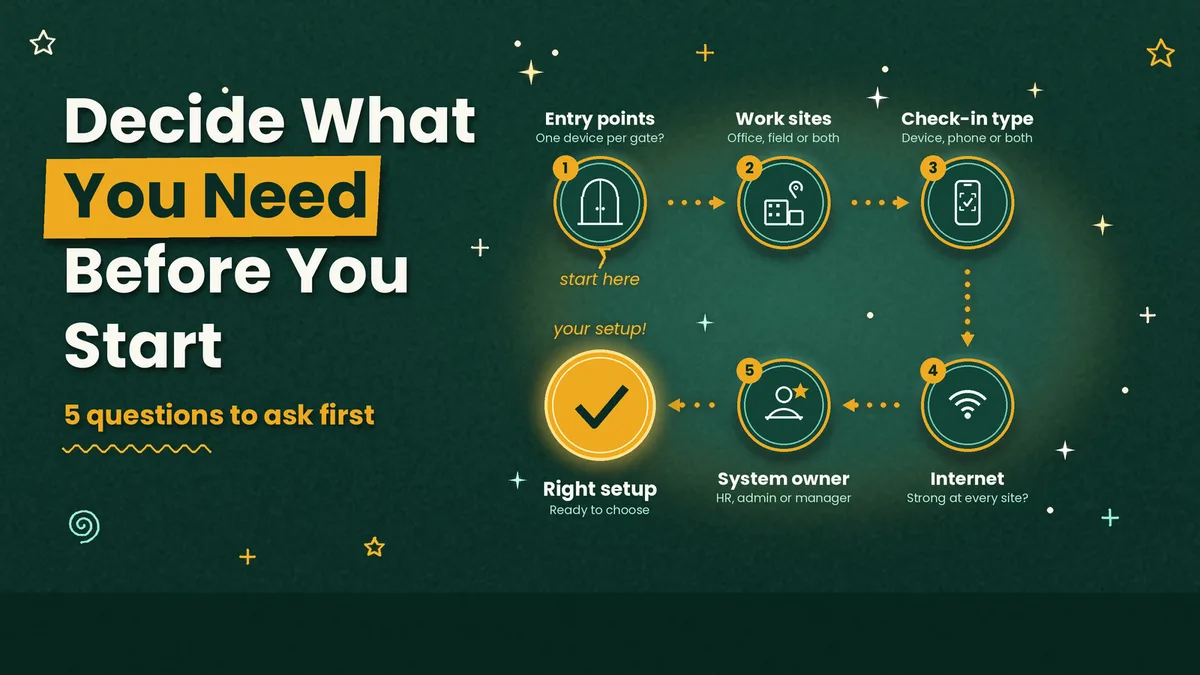
Planning saves more time than any setting. Start with five questions. How many entry points do you have, and does each one need its own device? Do all staff work at one site, or do some work in the field or at client locations? Will check-in use a fixed device, a phone, or both? What is the internet like at each site? And who will own the system, an HR person, an admin or an office manager?
Your answers decide the type of setup. A single office with one gate may need just one device or a shared tablet. A business with several branches is often easier to run with phone-based face capture, because there is nothing to install at each site. Cost depends on the same choices, and our guide to the face biometric attendance system, with its features and cost, helps you compare options before you commit.
A Step-by-Step Rollout Plan
A face recognition rollout works best in small stages instead of one big switch. The table below shows a simple plan that fits most small and mid-sized teams.
Stage | What to do | Owner | Suggested time |
|---|---|---|---|
1. Plan | List entry points, staff groups, shifts and rules | HR or admin | 1 day |
2. Set up | Add employees, shifts, holidays, late and half day rules | Admin | 1 day |
3. Enrol faces | Capture each face from the front, in good light | HR with staff | 1 to 2 days |
4. Pilot | Run with one team and note every failed match | Team lead | 1 week |
5. Go live | Roll out to all staff after a short briefing | HR | 1 day |
6. Review | Check reports, fix rules, re-enrol faces that fail | HR | Weekly for the first month |
The pilot is the step most companies skip, and it is the one that pays off. During that week you learn which entrance has poor light, which employees need a second enrolment, and whether your late rule is fair. Keep the old register running next to the system for that week, so nobody loses attendance if something goes wrong. After go live, review the reports every week for the first month, and fix rules before they turn into salary disputes.
What Affects Accuracy and How to Improve It
Accuracy in a face recognition attendance system depends less on the brand name and more on conditions you control. Light is the biggest factor. A face lit from behind or by harsh sunlight at an entrance is harder to match than one lit evenly from the front, so place the device where staff face the light. Camera height matters too, and it should sit at about eye level for most people. Enrolment quality comes next. Capture each face from the front with a neutral expression, and repeat the capture if the first result looks poor. For staff who wear glasses, enrol with and without them, and update the face when someone changes their look a lot.
Every system makes two kinds of mistakes. A false rejection means a real employee is not matched and has to try again. A false acceptance means the wrong person is matched. Vendors set a threshold that balances the two, and a stricter threshold means fewer false acceptances but more retries. Claims of very high accuracy usually come from tests in good conditions, so test the system with your own staff, at your busiest time, before you decide.
Stopping Photo and Proxy Cheating
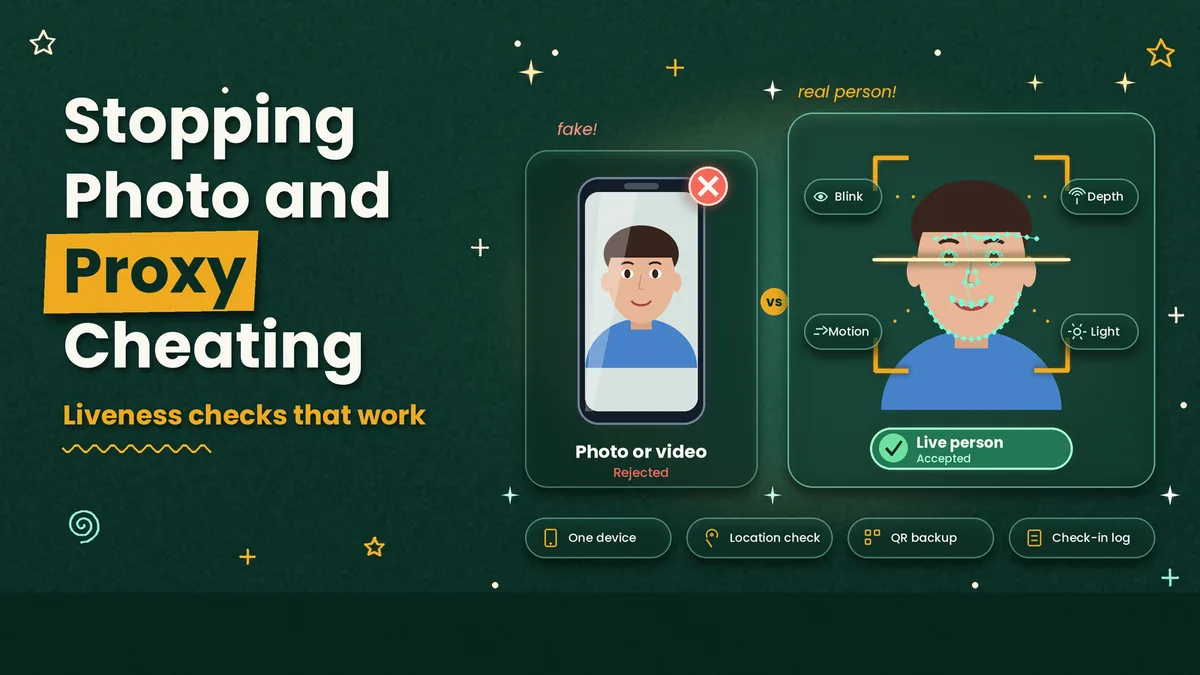
The question every buyer asks is whether someone can show a photo or a video on a phone. Good systems use liveness detection, which looks for signs of a live person, such as small movements, depth and the way light falls on the face, before accepting a match. Ask any vendor how their liveness check works, and test it yourself with a printed photo and a phone screen.
Other controls help as well. Tie each account to one device, check the location at check-in, and keep a record of each check-in so a manager can review doubtful cases. A face check at the moment of check-in, together with QR check-in as a backup when a face does not match, gives you strong control without slowing the queue.
Privacy and Consent for Face Data
Face data is personal data, and India's Digital Personal Data Protection Act, 2023 and the DPDP Rules, 2025 apply to how employers handle it. The main duties under the Rules are being phased in, with many of them expected to apply from around May 2027, but it is better to build good habits now. Tell employees in writing what you collect and why, and take their consent before you enrol their faces. Offer a simple alternative, such as a QR check-in or a PIN, for anyone who does not want to enrol. Limit who can see the data, store it securely, and delete a face template when the employee leaves.
Keep a clear policy and share it with your staff. This section is general information and not legal advice, so speak with a legal adviser before you finalise your policy.
Where Face Recognition Attendance Works Best
Offices and branch networks use it to end buddy punching and manual registers. Schools and coaching centres use it for staff, where the gate is the main check point. Factories and warehouses like it because workers arrive in batches and their hands may be dirty or gloved, which makes fingerprint devices unreliable. Retail and clinic chains use phone-based face capture so that each branch does not need hardware. Housing societies and facility teams use it to keep a reliable record of guards, housekeeping and maintenance staff, and a housing society management software can handle gate entry and visitor records alongside it.
Face Recognition Attendance with Attendi
Attendi covers the pieces a rollout needs. Employees can check in with face capture, which is available on the Pro plan, and with selfie attendance and QR attendance as other options on the higher plans, while field work attendance covers staff who work away from the office. Employee management keeps every record in one place. Custom settings let you define working hours, shifts, late rules, holidays and weekly offs, and leave management links approved leave to attendance, so a leave day is never marked as absent. Attendance reports give daily and monthly totals that are ready for payroll.
You can see the full flow on the how Attendi works page, and Attendi comes with a 15-day free trial when you sign up at attendi.in, so you can run the pilot step from this guide with your own team before you pay.
Final Thoughts
A face recognition attendance system is easy to switch on and easier to get wrong. The results come from the small decisions around it: a clear plan, good enrolment, a short pilot, fair rules and honest communication about face data. Test with your own staff, keep a backup method such as QR check-in, review the reports every week at the start, and write a simple privacy policy. With those steps in place, automated attendance saves hours of manual work every month and gives you records you can trust.