Face Biometric Attendance System Features Benefits and Cost
A face biometric attendance system marks attendance by reading a person’s face. There is nothing to carry, nothing to touch and no one to cover for a late friend. For owners and HR teams, that means cleaner records and less time spent fixing registers at month end.
This guide explains how the system works, what features matter, where it helps most, what it costs in India, and how to set it up so your team accepts it.
What Is a Face Biometric Attendance System?
It is an attendance method that uses a biometric, which is a body trait that can be measured. Here the trait is the face. A camera captures the face, software converts it into a template (a set of numbers), and the template is matched with the ones saved when each employee joined. If it matches, the time is recorded.
The camera can sit in a wall-mounted device at the gate, or in a phone or tablet. The record then goes to software that builds reports and sends hours to payroll.
How the System Works
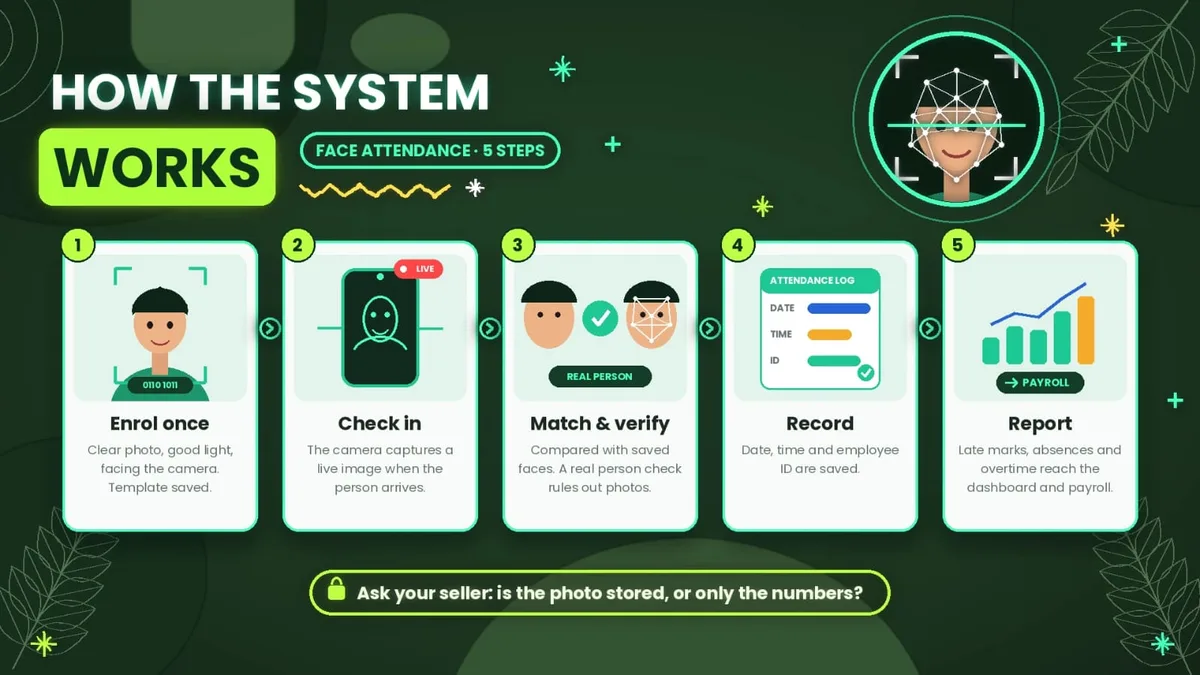
Enrol each person once. Take a clear photo in good light, facing the camera. Save the template. Many products store only the numbers and not the photo. Ask which one your seller keeps. Check in. The camera captures a live image when the person arrives. Match and verify. The system compares the image with saved faces, and a good one also checks that a real person is present, not a photo. Record. The date, time and employee ID are saved. Report. Late marks, absences and overtime appear in a dashboard and move to payroll.
Benefits of Face Biometric Attendance
Fewer fake punches. A face is tied to one person, so a card or PIN cannot be passed to a friend. No touch. Nothing is shared, which helps in kitchens, hospitals and factories where hands are gloved, wet or dirty. Fast check-in. A scan takes about two seconds in most product listings. Nothing to carry or lose. No cards to forget or replace. Less payroll work. Hours come from rules, not from a register. Clear records. Each punch has a name, a time and often a photo, so disputes end quickly.
Wall Device, Mobile App or Both?
Setup | How it works | Best for | Watch out |
|---|---|---|---|
Wall device | A camera fixed at the gate scans each person | One entrance with many people, such as a factory or school | Needs power, mounting and a network point |
Mobile attendance system | The employee checks in on a phone with a selfie or face match and location | Field, hybrid and multi-branch teams | Depends on the phone camera, battery and signal |
Device plus mobile app | Gate device for the main site, app for everyone else | Businesses with an office and outside staff | Needs one dashboard so the data stays together |
Most small teams start with the cheaper option, which is usually the app, and add a device later if one gate gets busy.
Face Biometric Attendance on a Phone
A mobile based attendance system brings the same face check to a phone. The employee opens the app and takes a selfie. The app can compare it with the saved face, add a live-face check, and record the location with a geofence, which is a virtual boundary around an allowed site.
This is useful when people work at customer sites, at several branches or from home. Look for fake location detection, offline mode that sends check-ins later, and low battery use. Without these, a phone-based check-in is easier to cheat than a gate device.
What a Biometric Attendance Management System Should Do
The camera only captures a face. The software around it decides how useful the data is. A good biometric attendance management system should:
Enrol and remove employees easily. Bring punches from several devices and apps into one dashboard. Apply shifts, grace time, half days and overtime by your rules. Keep a log of every edit or approval. Show late marks and absences by person and date. Link leave and send hours to payroll.
You can see how this flow works in practice on the how attendance reaches payroll page of a modern product.
Where It Helps Most
Factories and warehouses: dusty or gloved hands make fingerprints fail, and queues build at shift change. Offices: proxy punching stops and month-end work shrinks. Schools and colleges: staff are marked at the gate. Student data needs extra care. Hospitals and clinics: touch-free entry suits strict hygiene rules. Retail and restaurants: a changing team is enrolled and removed quickly. Field and project teams: an app with a location check replaces phone calls.
For more guides on devices and setup, see these face capture attendance resources.
Accuracy and Limits
No face system is perfect, and it helps to know why:
Light. Strong sun behind a person or a dim corridor lowers accuracy. Angle and distance. A turned head or a person standing too far away is harder to match. Changes in looks. A new beard, new glasses or a big weight change can cause failed scans, so re-enrol when needed. Photo tricks. A basic system can be fooled by a photo or a video. A live-face check makes this much harder. Large lists. The more faces enrolled, the more chances of a wrong match.
Sellers often quote accuracy figures such as 99%. These are claims from the maker, tested in good conditions. Measure accuracy at your own gate.
Common Problems and How to Fix Them
Failed scans in the morning. Sun behind the person confuses the camera. Move the device or add light on the face. A face stops matching. After a new beard or weight change, re-enrol that person. A long queue. One device handles about 100 people in a little over three minutes at best. Add a second device or stagger entry. Missing punches. Weak Wi-Fi or a power cut can stop a device. Use a wired network, offline mode and a battery. Wrong person accepted. Raise the match limit and re-enrol both people in good light.
Face Biometric Attendance System Cost in India
Basic face devices were listed from about ₹6,000 to ₹14,000 in October 2026. One 5,000-face model with Wi-Fi and a dual camera was listed at ₹9,850, with no battery. Some brands charge a yearly software fee, with licences listed at around ₹5,000 a year. Ask about installation, support and what happens if the camera fails.
Apps charge per user per month. Attendi’s per-user plans run from ₹39 to ₹59 plus 18% GST. For 25 employees on the ₹59 plan, that is ₹1,740.50 a month with GST. For 10 people, a ₹13,000 device costs about the same as 19 months of that plan, before any software fee for the device. For 50 people at one gate, a single device often works out cheaper over time.
How to Choose a System
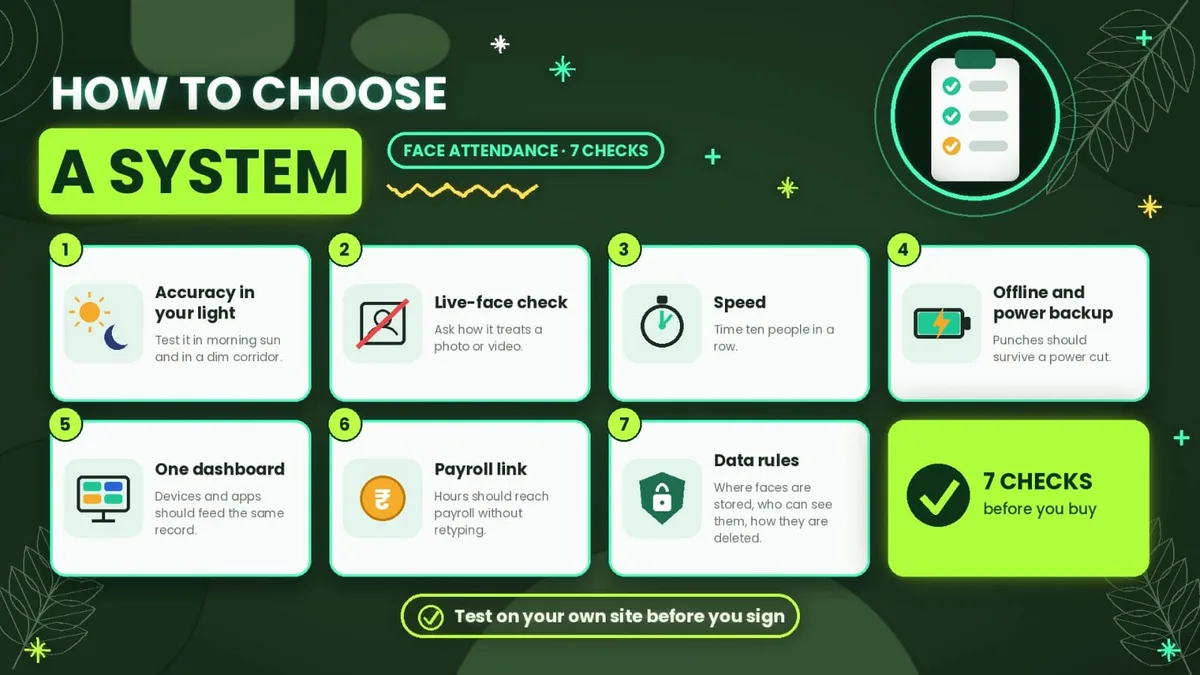
Accuracy in your light. Test it in morning sun and in a dim corridor. Live-face check. Ask how it treats a photo or video. Speed. Time ten people in a row. Offline mode and power backup. Punches should survive a power cut. One dashboard. Devices and apps should feed the same record. Payroll link. Hours should reach payroll without retyping. Data rules. Where faces are stored, who can see them, how they are deleted.
Test It Before You Pay
Most sellers show a perfect demo. Use a week to see the real behaviour:
Day 1: enrol about 10 people, including some with glasses, beards or caps. Day 2: test in morning and evening light. Day 3: with the employee’s permission, hold up their photo on a phone and note whether it passes. Day 4: switch off the internet and see whether punches are saved and sent later. Days 5 to 7: count failed scans and wrong matches, and compare them with your register.
How to Set It Up in 5 Steps
Pick the setup. Device, app or both, based on the table above. Tell your team. Explain what is collected and why, and take written consent. Enrol everyone in good light. Re-do any face that fails. Run a trial week. Record attendance but do not apply late marks. Fix failed scans and set shift rules. Go live and review. Check the first payroll report line by line, and compare late marks and disputes after 90 days.
A Look at Attendi
Attendi is an attendance and payroll app for office, multi-location and field teams, available on Android and iOS. Plans are priced per user per month, with 18% GST extra:
Basic, ₹39: QR attendance, leave, working hours and reports. Advanced, ₹49: adds selfie attendance and payroll. Pro, ₹59: adds face capture and field workforce tracking.
There is a 3-day free trial in the app. Use the trial week from the steps above to see how it behaves with your own people.
Privacy and Legal Points in India
Face data is biometric data, so give written notice, take consent, collect only what you need, and delete it when a person leaves. India’s Digital Personal Data Protection Rules were notified in November 2025, and the notice and consent rules start on 13 May 2027. Until then, the older IT Rules of 2011 already treat biometric data as sensitive and expect consent and reasonable security. For students under 18, a parent’s or guardian’s consent is needed. Keep another way to mark attendance for anyone who says no. This is general information, not legal advice.
FAQs
What is a face biometric attendance system? It is an attendance method that identifies a person by their face and records the time, with reports and payroll linked.
Is it accurate? It can be, in good light and with good enrolment, but no system is perfect. Test it at your own gate and count the errors.
Can a photo fool it? Basic systems can be fooled. A live-face check makes it much harder.
Is a mobile app as good as a wall device? For field and multi-site teams, yes. For one busy gate, a device is often better.
Does it work without internet? Most devices and many apps save punches and send them later. Ask before you buy.
Do employees have to agree to it? Give written notice, take consent, and keep another way to mark attendance for anyone who refuses.
Does it work with a mask? Some systems cope and others do not. Enrol people with the items they usually wear, and test before you buy.
Final Thoughts
A face biometric attendance system ties each punch to a real person, cuts payroll work and removes cards and fingerprints from the daily routine. Choose the setup that fits how your people work, check the live-face feature, and run a one-week trial before you commit.