Employee Working Hours and Overtime in India

Ask any HR manager what causes the most arguments at month end, and the answer is usually the same: hours. Who came in when, who stayed late, and how much extra pay is due. When employee working hours live in a notebook, a shared sheet or someone's memory, these arguments are hard to settle, and small errors repeat every month.
This guide explains what counts as working time, what the rules in India say about weekly limits and overtime in 2026, how a work time tracker removes guesswork, and how to use the overtime calculation formula with a worked example. Whether you run a shop, an office, a factory floor or a field team, you can use the same approach.
What Counts as Employee Working Hours?
Employee working hours are the time an employee spends at work and available to the employer, recorded for the day, the week and the month. The count usually starts at check-in and ends at check-out, and it includes short paid breaks. Unpaid lunch breaks and other rest intervals are normally left out, depending on your company policy and the rules that apply to your establishment.
It helps to separate three terms that often get mixed up. Scheduled hours are what the roster says an employee should work. Actual hours are what the attendance record shows they worked. Overtime hours are the actual hours that go beyond the legal or agreed limit. Most payroll disputes happen because a company tracks only the first one. If your records show scheduled hours but not actual hours, you cannot prove what happened on a busy day, and you cannot pay extra work correctly. A tool that can track working hours and attendance history for each person closes this gap.
Working Hours and Overtime Rules in India
India's labour codes have changed how working hours are managed, and the central rules under them were notified on 8 May 2026. In simple terms, the standard limit is 8 hours a day for daily wage workers and 48 hours a week for other workers. Work beyond these limits is overtime, and overtime must be paid at twice the ordinary rate of wages. The pay is due at the end of the wage period, and employers are expected to keep proper records of the extra hours.
Two points need care. First, state rules and the older Shops and Establishments Acts still matter in practice, and daily limits, weekly rest and overtime caps can differ from state to state. Second, the rules treat part hours in a set way, so an overtime entry of 40 minutes may be counted differently from what you expect. Read the exact rule for your sector, or speak with a labour compliance consultant, before you finalise your payroll policy. This article explains the method and is not legal advice.
Why Tracking Employee Working Hours Matters
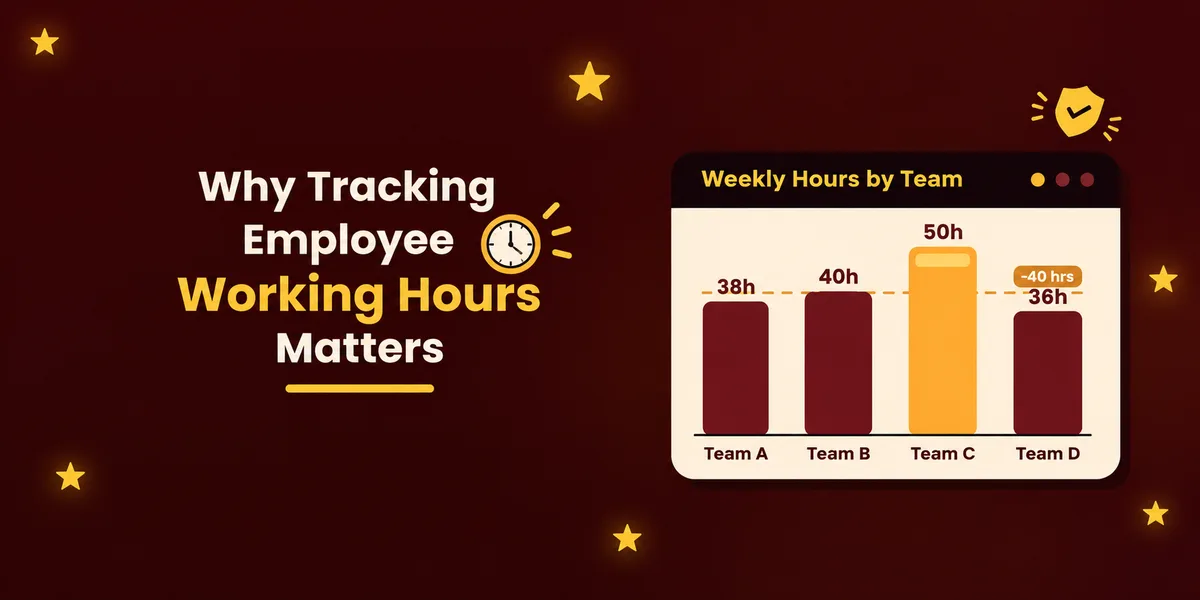
Accurate hours protect both sides. For employees, correct records mean they are paid for every extra hour, and they can see their own attendance history whenever they want. For employers, a clean record is the first thing an inspector or auditor asks for, and it is the best defence if someone questions a salary slip later.
There is a business reason too. When you can see working hours by team and by week, patterns appear. One department may run 10 hours over every week, which points to a staffing gap. Another may show frequent late arrivals on Mondays, which may be a roster problem and not a discipline problem. Overtime that looks small on one day becomes a large cost across a month, and you only notice it when the numbers are in front of you. Long hours repeated week after week also lead to more mistakes and more absences, so watching the totals protects the quality of work as well.
Choosing a Work Time Tracker
A work time tracker records when each person starts and stops work and turns those timestamps into daily and monthly totals. The old methods are a paper register, a punch card or an Excel sheet. They work for a very small team, but they break down quickly. Entries are written after the fact, handwriting gets misread, and someone has to add up the totals by hand at the end of the month.
A digital tracker removes most of these problems. When you compare options, look for a few practical things. It should capture check-in and check-out on the spot, so nobody fills in the time later. It should fit the way your team works, whether that is a fixed office shift, several branches or staff who visit client sites. It should let you set shift timings, late rules, holidays and weekly offs, so that late marks and overtime come from the system and not from a person with a calculator. And it should give you reports you can open in a minute when payroll is due.
Attendi is built around this idea. You can see working hours and attendance history for every employee in one place, with employee records, leave management and attendance reports connected to the same data. Employees can check in with a QR code attendance system at the office entrance, and teams on the higher plans can use selfie attendance, face capture and field work attendance when people work outside the office.
Overtime Calculation Formula
Overtime pay depends on two numbers: the hourly rate of the employee and the number of overtime hours. The overtime calculation formula has three steps.
First, find the ordinary hourly rate. Take the monthly wages that your policy and the wage rules count for overtime, and divide them by the paid working days in the month multiplied by the hours in a day. Many Indian employers use 26 days and 8 hours, which gives 208 hours a month. Another common method multiplies the 48-hour week by 4.33, which also gives about 208, so both methods land close together.
Second, find the overtime hours. If you track weekly, this is the total hours worked in the week minus 48. For a daily wage worker, it is the hours worked beyond 8 in the day.
Third, double the hourly rate to get the overtime rate, and multiply it by the overtime hours. In one line, the formula is: overtime pay = (monthly wages ÷ 208) × 2 × overtime hours.
Whether the wage base is only basic salary plus dearness allowance or a wider figure is a policy and legal question. Confirm it for your company once, and then use the same base for everyone.
How to Calculate Overtime: A Worked Example
Let us see how to calculate overtime for a small team that works 26 days a month and 8 hours a day, so the divisor is 208. The table below shows four employees with different wages and overtime hours.
Employee | Monthly wages | Hourly rate (÷ 208) | Overtime rate (× 2) | Overtime hours | Overtime pay |
|---|---|---|---|---|---|
A | ₹20,800 | ₹100 | ₹200 | 6 | ₹1,200 |
B | ₹26,000 | ₹125 | ₹250 | 10 | ₹2,500 |
C | ₹31,200 | ₹150 | ₹300 | 4 | ₹1,200 |
D | ₹41,600 | ₹200 | ₹400 | 8 | ₹3,200 |
Take Employee A. Monthly wages of ₹20,800 divided by 208 give an hourly rate of ₹100. The double rate is ₹200, and with 6 overtime hours the overtime pay is ₹1,200. Employee D has higher wages and 8 overtime hours, so the amount is ₹3,200. Together the four employees add ₹8,100 to the month's payroll, which shows how quickly extra hours become a real cost.
A weekly case works the same way. Suppose Employee B works 54 hours in a week after unpaid breaks are removed. The first 48 hours are normal time, and the remaining 6 hours are overtime. At ₹125 an hour, the overtime for that week is 6 × ₹250, which is ₹1,500. Keep an overtime register that records the date, the employee name, the normal hours, the overtime hours, the rate and the amount paid, because this is the record you will need if anyone asks how a figure was reached. Also check how your rules round part hours and whether there is a cap on overtime hours over a quarter. Recording hours with online attendance software also keeps this register accurate without extra typing.
Common Mistakes in Employee Working Hours Records
The first mistake is counting breaks as work, or the other way round, without a written rule. The second is letting managers approve overtime by message with no entry in the system, so payroll cannot match it later. The third is using different divisors for different people, such as 26 days for one employee and 30 for another, which creates unfair gaps in pay. The fourth is ignoring weekly offs and public holidays, because work on those days often has its own pay rule and needs to be marked clearly. The fifth is keeping hours in one tool and payroll in another, so every month someone copies figures by hand and errors creep in. Finally, many businesses do not keep old records long enough, so keep your attendance and overtime registers for the period your rules ask for.
Setting Up Employee Working Hours in Attendi
Attendi connects these steps so that nobody has to calculate by hand. A practical setup goes like this. Start by adding your employees and setting shift timings, late rules, holidays and weekly offs in the settings. Then choose how people mark attendance: QR, selfie or face capture for the office, and field work attendance for staff on the move. Every check-in builds the working hours record on its own. Managers can see who is present, late, absent or on leave in real time, and leave requests are approved in the same place, so a leave day is not counted as an absent day.
At month end, open the attendance reports to review total hours and overtime for each person. On plans that include payroll, attendance and overtime data flow into payroll, so you do not retype numbers. You can see the full flow on the how Attendi works page, and Attendi comes with a 15-day free trial when you sign up at attendi.in, so you can test the setup with your own team before you decide.
Final Thoughts
Employee working hours are more than a payroll input. They show how your business really runs, who is overloaded and where time is lost. Record actual hours at the point of work, know the 48-hour weekly limit and the double rate for overtime, apply the same overtime calculation formula to everyone, and review the totals every month. A reliable work time tracker makes each of these steps quicker and removes most of the arguments that used to come with them. Start with a clear policy, put it into your attendance system, and let the records settle the questions.