Worker Daily Attendance Sheet Format Template and Duty Hours

A worker daily attendance sheet helps businesses record employee attendance, track duty hours and maintain accurate work records. Whether you manage a small office, factory, warehouse, shop or construction site, a proper attendance format makes it easier to monitor working hours, late arrivals, absences and overtime.
Maintaining daily attendance records also helps businesses calculate employee work duration, prepare payroll and identify attendance-related issues. A clear attendance sheet ensures that both employers and workers have a record of the hours worked during a particular day.
What Is a Worker Daily Attendance Sheet?
A worker daily attendance sheet is a document used to record when workers arrive at work, when they leave and how many hours they complete during their shift. Depending on the business requirements, it can be maintained in a register, spreadsheet or digital attendance system.
The sheet may include the worker's name, employee ID, date, in-time, out-time, total duty hours, overtime hours and attendance status. These details help employers maintain organised records and review employee attendance whenever required.
For businesses with multiple workers or shifts, a standard attendance format can reduce confusion and make daily attendance management easier.
Why Is a Daily Attendance Sheet Important?
A daily attendance sheet helps businesses maintain accurate employee records and monitor the time workers spend on duty. When attendance is recorded consistently, employers can identify late arrivals, early departures and unplanned absences more easily.
It also supports payroll preparation because recorded duty hours can be checked against the applicable salary, overtime and leave rules. Clear records can help reduce misunderstandings between workers and management about attendance or hours worked. Businesses can also improve employee attendance record management by maintaining consistent and organised records.
For supervisors, attendance records provide a quick overview of who is present, who is absent and whether enough workers are available for the day's operations. They are particularly useful in factories, warehouses, construction sites and other workplaces where employee availability affects daily work.
Worker Daily Attendance Sheet Format
A worker attendance sheet should be simple to understand and easy to update. The format can be adjusted according to the number of workers, the type of workplace and the information required for payroll.
The following is an example of a daily attendance sheet format:
Date | Worker Name | In-Time | Out-Time | Total Duty Hours | Overtime | Attendance Status |
|---|---|---|---|---|---|---|
26/10/2026 | Worker A | 9:00 AM | 6:00 PM | 8 hours | 0 hours | Present |
26/10/2026 | Worker B | 9:15 AM | 6:15 PM | 8 hours | 0 hours | Present |
26/10/2026 | Worker C | — | — | 0 hours | 0 hours | Absent |
Note: This is an illustrative format. Actual duty hours depend on break time, shift duration and workplace rules.
Businesses can add employee IDs, department names, supervisor signatures or remarks if these details are needed. The important point is to record attendance consistently and ensure that the information is accurate.
How to Calculate Worker Daily Duty Hours
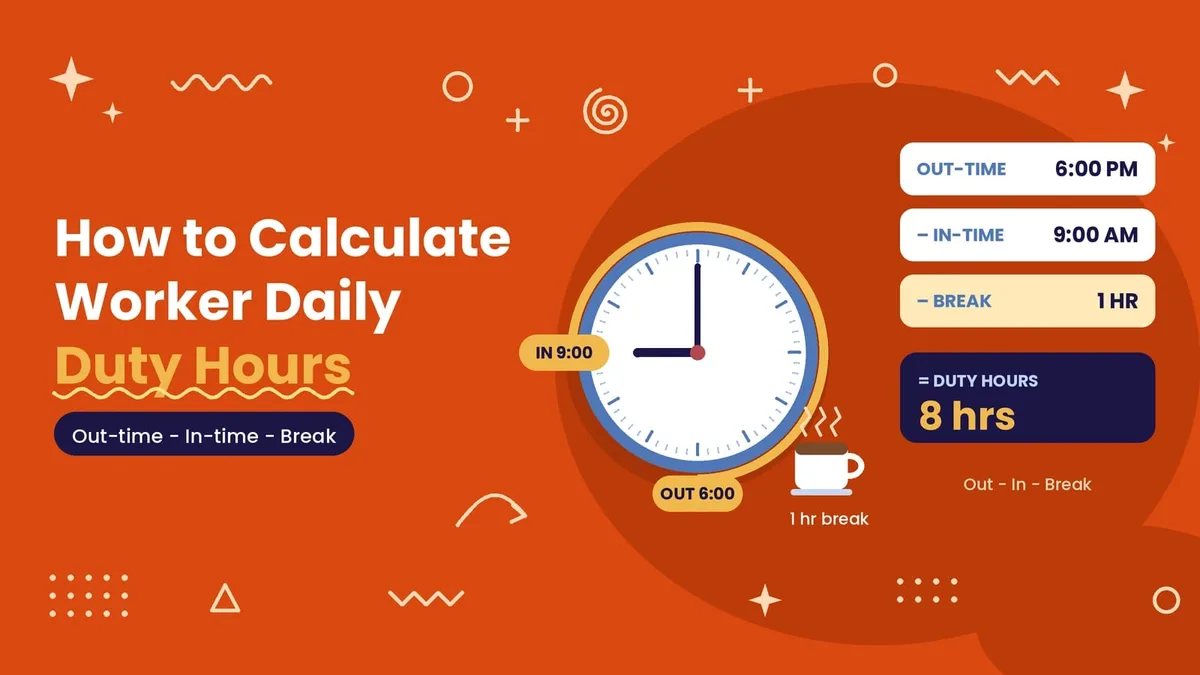
Worker daily duty hours are generally calculated by subtracting the recorded in-time from the out-time and then accounting for unpaid breaks, where applicable.
For example, if a worker arrives at 9:00 AM and leaves at 6:00 PM, the total time between arrival and departure is nine hours. If the worker takes a one-hour unpaid break, the actual working time is eight hours.
The calculation should reflect the workplace's shift policy and applicable employment rules. For overnight shifts, the recorded start and end dates may also need to be considered so that the hours are calculated correctly.
Accurate duty-hour calculations help employers review work duration, identify overtime and prepare attendance records for payroll processing.
Difference Between Attendance Hours and Working Hours
Attendance hours represent the time between an employee's recorded arrival and departure. Working hours refer to the time spent performing work after accounting for applicable breaks and other periods that are not counted as working time under the relevant policy.
For example, a worker who stays at the workplace from 9:00 AM to 6:00 PM has nine hours between arrival and departure. If a one-hour break is excluded, the recorded working time would be eight hours.
Keeping these records separate helps avoid errors in work-hour calculations and overtime tracking. Businesses should follow their applicable policies and legal requirements when deciding how breaks, overtime and different shifts are recorded.
How to Maintain Accurate Daily Attendance Records

A reliable attendance process starts with recording the correct arrival and departure times for every worker. Attendance should be updated daily rather than being completed from memory at the end of the week or month.
The person responsible for attendance should check missing entries, incorrect timings and unusual attendance records before finalising the daily sheet. If a worker forgets to mark attendance, the correction should be verified and documented according to the workplace process.
Employers should also maintain consistent attendance rules for late arrivals, early departures, approved leave and overtime. Workers and supervisors should understand how attendance is recorded and whom to contact when a correction is required.
For larger teams, reviewing attendance records regularly can help identify repeated errors and improve the reliability of payroll data. Businesses can also explore face recognition attendance tracking as an option for recording attendance through automated identification methods.
Common Problems with Manual Attendance Sheets
Manual attendance sheets are easy to start using, but they can become difficult to manage as the workforce grows. Handwritten entries may be unclear, in-time or out-time details may be missed, and calculations can become inconsistent when many workers have different shifts.
Paper registers can also take time to review when a supervisor needs to check attendance for a specific date or calculate monthly working hours. If records are misplaced or damaged, retrieving the information can become difficult.
Another challenge is calculating overtime correctly. When duty hours, breaks and shift timings are not recorded clearly, payroll staff may need to verify the same information repeatedly.
Using a consistent format and checking entries daily can reduce these problems. Businesses with larger teams may also consider digital attendance tracking to organise records and simplify reporting.
Manual Attendance Sheet vs Digital Worker Hours Tracking
A manual attendance sheet can be suitable for a small team with a straightforward shift schedule. It is inexpensive to maintain and does not require specialised equipment, but calculations and monthly summaries may take additional time.
Digital worker hours tracking can help businesses record attendance, organise working-hour data and review reports more efficiently. Depending on the system, features may include attendance marking, shift management, overtime records, leave tracking and payroll reports. Automated employee attendance monitoring can also be considered when businesses evaluate digital approaches to attendance management.
The right approach depends on the size of the workforce, the number of work locations, the complexity of shift schedules and the business's record-keeping needs. Businesses should choose a method that employees and supervisors can use consistently.
Building Your Own Worker Hours Tracker
Some businesses need a worker hours tracker built around their own process, for example with custom duty hour rules, overtime calculations, shift scheduling or a link to an in-house attendance system. A well-designed worker hours tracking system helps businesses record employee working hours, monitor overtime and maintain accurate work hour records. For most teams, a ready-made work time tracker is faster to set up, while businesses with specific requirements can explore a customised solution, including biometric attendance system integration where appropriate.
Frequently Asked Questions
What should a worker daily attendance sheet include?
A worker daily attendance sheet should generally include the date, worker name, in-time, out-time, total duty hours and attendance status. Businesses can add overtime, break duration, employee ID or supervisor remarks when required.
How do I calculate daily worker hours?
Subtract the recorded start time from the end time and account for applicable unpaid breaks. For overnight shifts, consider the correct dates as well as the recorded times.
Can I maintain worker attendance in Excel?
Yes. A spreadsheet can be used to record worker attendance, calculate duty hours and organise daily records. The formulas should be checked carefully, especially for breaks, overtime and overnight shifts.
Is a manual attendance sheet suitable for every business?
A manual sheet may work well for a small team with simple shifts. Businesses with many workers, multiple locations or complex schedules may benefit from a digital attendance system.
Why is accurate worker attendance important for payroll?
Accurate attendance records help businesses verify hours worked, review overtime and prepare payroll using the applicable salary and attendance policies. Clear records can also help resolve disputes about working time.
Final Thoughts
A worker daily attendance sheet is a practical way to record employee attendance, monitor duty hours and maintain organised workplace records. By using a consistent format and checking attendance entries regularly, businesses can reduce recording errors and make work-hour calculations easier.
Whether a business uses a paper register, spreadsheet or digital worker hours tracker, the key is to maintain accurate records and apply attendance rules consistently. A suitable attendance process helps supervisors monitor daily workforce availability and gives payroll teams reliable information for reviewing working hours.