Face Recognition Biometric Devices Types Specs and Cost
Face recognition biometric devices are small wall-mounted units that read a person’s face and decide who they are. Businesses fit them at gates and doors to mark attendance, open locks and keep a record of who came in. The idea is simple, but the products differ a lot in camera quality, speed, security and price.
This guide explains how these devices work, the types you can buy, the specs worth checking, what they cost in India, and how to test one before you commit.
What Are Face Recognition Biometric Devices?
A face recognition device has a camera, a small computer, a screen and a way to connect to software. It captures a face, converts it into a template (a set of numbers), compares it with saved templates, and gives a result in about a second or two. A biometric is a body trait that can be measured, and the face is one of them, so the data counts as sensitive personal data.
Most devices in India are used for attendance. Some also control doors, and some log visitors.
Face Identification vs Face Verification
You will see both terms in product sheets, and they mean different things.
Face verification is a one-to-one check. The person claims an identity, for example by tapping a card or typing an ID, and the device checks whether the face matches that one saved template. It is fast and has fewer wrong matches.
Face identification is a one-to-many check. The device looks at a face and searches through all saved templates to find who it is, with no card or ID first. It is more convenient, but the more people you enrol, the more chances of a wrong match.
Most attendance devices use face identification, because people walk up and scan without typing anything. If you have a very large list of faces, ask the seller about the limits, or use a card plus face to make it a one-to-one check.
Types of Face Recognition Devices
Type | What it does | Cost level | Best for | Watch out |
|---|---|---|---|---|
Standalone face device | Stores faces and punches inside, exports by USB or network | Low to medium | One site, small to mid-size team | Reports need software or manual export |
Face plus fingerprint or card | Offers a backup method when the face scan fails | Medium | Mixed environments, people with changing looks | Higher price, more setup |
Face device with door control | Scans and unlocks a door through a relay | Medium to high | Server rooms, labs, offices with restricted areas | Door wiring needs a qualified person |
Cloud-connected face terminal | Sends punches to online software in real time | Medium | Several sites, owners who want live reports | Needs stable internet and a clear software fee |
Phone or tablet camera | Uses an app instead of a fixed device | Low, billed per user | Field and hybrid teams | Depends on phone, battery and signal |
What Is Inside a Face Recognition Device?
Camera. Many devices use two, one to see the face and one to judge depth or detect a live person. Infrared light helps in dim places and against glare. The processor and memory hold the templates and run the matching. The screen and speaker show the name and tell the person if the scan worked.
Wi-Fi, a LAN cable and USB are common ports. Door control needs a relay. A battery is optional on some models, and useful where power cuts are common.
Spec Sheet: What to Check
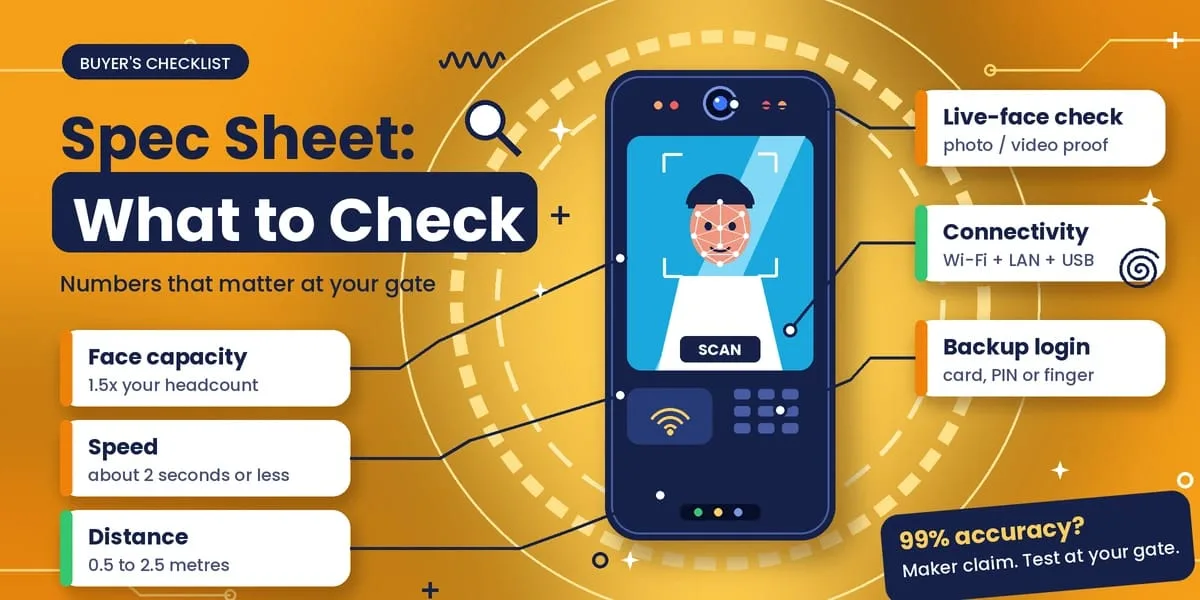
Sellers list many numbers. These are the ones that change how the device behaves at your gate.
Face capacity. Pick at least 1.5 times your headcount, so growth does not force a replacement. Recognition speed around two seconds or less is typical in listings, but test it. Recognition distance is often 0.5 to 2.5 metres, and shorter when the live-face check is on.
For light handling, look for wide dynamic range or a built-in light, because strong sun behind a person is the most common problem. Ask how the live-face check treats a photo or a video. A dual camera or infrared sensor makes it harder to fool.
For connectivity, choose Wi-Fi and LAN, with USB as a backup. Log capacity should be tens of thousands of punches at least. A backup login through a card, PIN or fingerprint is useful for people who fail the face scan.
Sellers also quote accuracy figures such as 99%. These are claims from the maker, tested in good conditions. Measure accuracy at your own gate.
Smart Attendance: Turning Device Data Into Decisions
A device alone only records a punch. Smart attendance means the punch goes into software that applies your shift rules, counts late marks and overtime, links leave and sends hours to payroll. Some systems also add a location check and a photo log. You can see how this flow works on the how attendance reaches payroll page of a modern product.
Before you buy a device, ask whether it connects to attendance software you already use. A device with no software link gives you files to clean up every month.
Where Face Recognition Devices Are Used
Factories and warehouses use face recognition devices because gloved or dusty hands make fingerprint scanners fail. In offices, staff check in at the door and the data goes to payroll. Schools and colleges use them for staff attendance at the gate, although student data needs extra care.
In hospitals and clinics, touch-free entry suits places with strict hygiene rules. In restricted rooms, a face device with door control opens the lock only for approved people.
For more on biometric device types and setup, see these biometric attendance device guides.
Where to Fix the Device
Most failed scans come from placement, not from the device.
Height should be about eye level for most of your staff, roughly 1.4 to 1.6 metres from the floor. Check the seller’s guide. For light, avoid a spot with a bright window or the sun behind the person. Leave room to stand 0.5 to 1 metre in front, with no crowding.
Keep a power socket close, plus a LAN point if you use one. One device at two seconds per person handles 100 people in a little over three minutes at best. For a large shift start, fit a second device.
Common Problems and How to Fix Them
Failed scans in the morning can happen because strong sun behind the person confuses the camera. Move the device or add light on the face.
A face may stop matching after a new beard, new glasses or a big weight change. Re-enrol that person. If the wrong person is accepted, raise the match limit, and re-enrol both people in good light.
Missing punches can happen when weak Wi-Fi or a power cut stops the device. Use a wired network, offline storage and a battery. If the queue is slow, add a second device or stagger entry at shift start.
Face Recognition Biometric Devices Cost in India
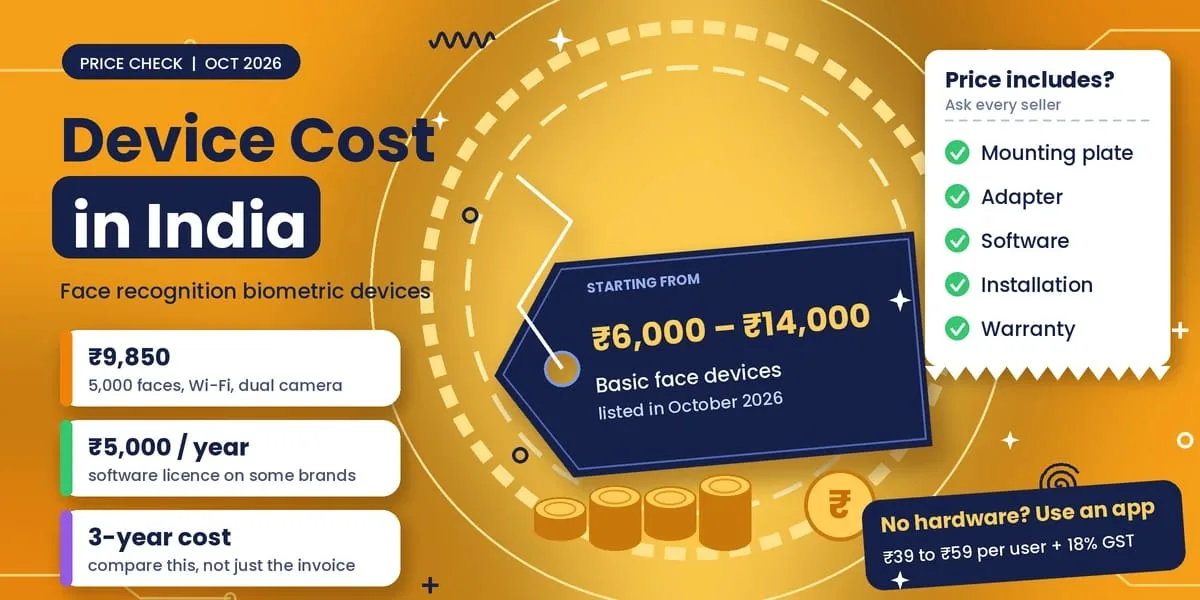
Basic face devices were listed from about ₹6,000 to ₹14,000 in October 2026. One 5,000-face model with Wi-Fi and a dual camera was listed at ₹9,850, with no battery. Models with door control, larger capacity or more backup methods cost more. Some brands charge a yearly software fee, with licences listed at around ₹5,000 a year.
Before you compare quotes, ask what the price includes: mounting plate, adapter, software, installation and warranty. Look at the cost over three years, not only the invoice.
If you would rather not buy hardware, apps charge per user. Attendi’s per-user plans run from ₹39 to ₹59 plus 18% GST, so 25 employees on the ₹59 plan cost ₹1,740.50 a month with GST.
Privacy and Security
A face is biometric data, so treat the device and its data with care.
Ask whether the device stores a template or a photo, and where the data sits. Check that data is encrypted when stored and when sent. Limit who can view or export faces, and delete a person’s data when they leave.
Give staff written notice and take consent. India’s Digital Personal Data Protection Rules were notified in November 2025, and the notice and consent rules start on 13 May 2027. Until then, the older IT Rules of 2011 already treat biometric data as sensitive and expect consent and reasonable security.
Keep another way to mark attendance for anyone who says no.
This is general information, not legal advice.
Test a Device Before You Buy
Most sellers show a perfect demo. Use a week to see the real behaviour.
On Day 1, enrol about 10 people, including some with glasses, beards or caps. On Day 2, test in morning and evening light. On Day 3, with the employee’s permission, hold up their photo on a phone and note whether it passes.
On Day 4, switch off the internet and check whether punches are saved and sent later. During Days 5 to 7, count failed scans and wrong matches, and compare them with your register.
A Look at Attendi
Attendi is an attendance and payroll app for office, multi-location and field teams, available on Android and iOS. Plans are priced per user per month, with 18% GST extra.
The Basic plan costs ₹39 and includes QR attendance, leave, working hours and reports. The Advanced plan costs ₹49 and adds selfie attendance and payroll. The Pro plan costs ₹59 and adds face capture and field workforce tracking.
There is a 3-day free trial in the app. Use the test above during the trial.
FAQs
What is a face recognition biometric device?
It is a fixed unit with a camera that identifies a person by their face and records the time or opens a door.
What is the difference between face identification and face verification?
Verification checks one face against one saved template. Identification searches all saved faces to find who the person is.
Is a face recognition device accurate?
It can be, in good light and with good enrolment, but no device is perfect. Test it at your own gate.
Can a photo fool it?
Basic devices can be fooled. A live-face check makes it much harder.
Does a face recognition device work without internet?
Most devices save punches inside and send them later. Live reports need Wi-Fi or a LAN cable.
Do employees have to agree to it?
Give written notice, take consent, and keep another way to mark attendance for anyone who refuses.
How much does a face recognition device cost?
Basic devices were listed from about ₹6,000 to ₹14,000 in October 2026. Ask for a total with GST, installation and any yearly software fee.
Does it work with a mask?
Some devices cope and others do not. Enrol people with the items they usually wear, and test before you buy.
Final Thoughts
A good face recognition biometric device is accurate in your light, quick in a queue, hard to fool with a photo, and linked to software that your payroll team can use. Check the specs that matter, fix it in the right place, and test it for a week before you commit.