Face Recognition Attendance System Cost and Buying Guide
A face recognition attendance system marks a person present by looking at their face, so nobody needs a register, a card or a finger on a scanner. Owners start looking for one when a friend punches in for a late employee, when the fingerprint machine fails on dusty hands, or when the HR team spends the last two days of every month adding up hours.
This guide covers what a face recognition attendance system costs in India, how to choose one, and how to test it before you pay. It also explains how the system works and how it compares with other methods.
What Is a Face Recognition Attendance System?
It is a tool that identifies an employee from their face and records the time they arrive and leave. It works through a camera, either on a wall-mounted face attendance machine or inside a phone app. The record goes to software that builds reports and sends hours to payroll. Offices, factories, schools, hospitals and construction sites all use it.
How a Face Attendance System Works
Enrolment. Each employee’s face is captured once, ideally from a few angles. Many products save a template, which is a set of numbers that describes the face, instead of the photo. Ask the seller which one they keep. Capture. At check-in, the camera takes a live image. Matching. The software compares that image with the saved faces and looks for the closest match. Liveness check. Better systems also check that a real person is standing there, for example by looking for a blink or by using an infrared sensor. This stops a photo on a phone from passing. Record. If the match is good, the time is saved and shows on the dashboard. Report. At month end, hours, late marks, overtime and leave move to payroll.
Smart Attendance: Face, Location and Payroll Together
Smart attendance means the face scan is not working alone. Many systems now add a GPS boundary, called a geofence, so a check-in only counts if the person is at an allowed site. Others add the time, a photo and a log of edits. Put together, you get proof of who, where and when.
That combination fixes the four problems owners complain about most:
Proxy punching. A face is much harder to share than a card or a PIN. No method is perfect, which is why the testing plan below matters. Queues at shift start. A scan takes a few seconds and needs no touch. Month-end errors. When attendance flows straight into payroll, nobody types hours from a register into a sheet. You can see this flow step by step on how attendance reaches payroll in a modern system. Shared surfaces. Nothing is touched, which helps where hands are gloved, wet or dirty.
Biometric Face Attendance vs Fingerprint vs RFID Card vs Register
Face and fingerprint are both biometric methods, because they identify the body and not an object. A card or a register identifies only what a person carries or writes.
TABLEPLACEHOLDERThere is no single winner. A dusty warehouse and a quiet office need different things, so pick by your site, not by what is popular. For more device and setup guides, see these biometric attendance guides.
Face Attendance Machine or Mobile App?
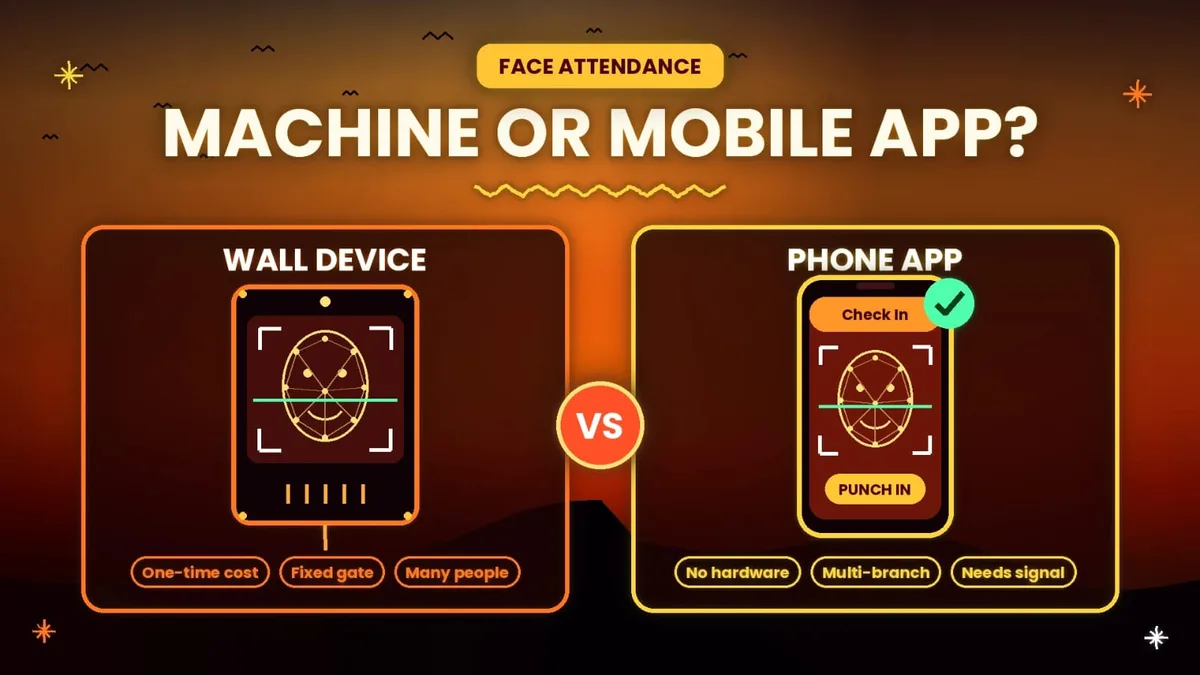
A face attendance machine is a wall-mounted device. It suits one fixed entrance with many people. You pay once, but you also need a mounting spot, power, a network connection and ideally a battery for power cuts.
A mobile app needs no hardware. Staff use their own phones or one shared tablet, and it works across branches. The catch is that it depends on the phone camera and a decent signal, and not every worker has a smartphone.
A simple way to decide:
Under 20 staff in one office: an app is cheaper to start. One small device also works. 20 to 200 staff at one site: a device at the gate, plus an app for people who travel. Factory with a main gate: a device at the gate. Several branches or staff who work outside: an app. School or college: a device for staff. Student data needs extra care, covered in the privacy section.
Face Recognition Attendance System Cost in India
Basic face machines were listed from about ₹6,000 to ₹14,000 in October 2026. One 5,000-face model with Wi-Fi and a dual camera was listed at ₹9,850 with no battery. Some brands sell the software separately, with licences listed at around ₹5,000 a year.
Beyond the device price, ask about installation, which usually covers mounting, wiring and a network point. Ask about extras too, such as a support contract, a payroll add-on or a replacement camera, and who pays when something breaks.
Apps charge per user per month instead. Attendi’s per-user plans run from ₹39 to ₹59 plus 18% GST, so 25 employees on the ₹59 plan cost ₹1,740.50 a month with GST. For 10 people, a ₹13,000 device costs about the same as 19 months of that plan, before any software fee for the device. For 50 people at one gate, a single device often works out cheaper over time. Ask every seller for a total with GST.
8 Checks Before You Buy
Accuracy in your light. Gate in morning sun, a dim corridor, an evening shift. Liveness detection. Ask how it treats a photo or video of a face. Speed in a queue. Time ten people one after another. Power backup. A battery or a plan for power cuts. Offline mode. Does it save punches and send them later when the internet returns? Payroll link. Can hours, late marks and overtime reach payroll without retyping? Capacity. How many faces it holds, and what happens when you grow. Support and data. Local support, warranty, where the data is stored, and whether it can be deleted on request.
Sellers also quote accuracy figures such as 99%. Treat these as claims from the maker. They are tested in good conditions and say little about a dusty factory gate at 6 in the morning.
How to Test a System Before You Pay
Most sellers show a perfect demo. Use a week to see how it behaves in your own place:
Day 1: enrol about 10 people, including some with glasses, beards, caps or scarves. Day 2: test at the entrance in morning and evening light. Day 3: with the employee’s permission, hold up their photo on a phone and note whether it passes. Day 4: switch off the internet and check whether punches are saved and sent later. Day 5: time the queue during the busiest 15 minutes. Days 6 and 7: count failed scans and wrong matches, and compare them with your register.
Write the numbers down. If people keep failing to check in, the system will cost you more time than it saves.
Common Problems and How to Fix Them
Most problems come from light, old photos or weak internet. If a face is not recognised, add light and move the device away from direct sun. If it fails with glasses or a mask, re-enrol the person with them. After a beard or weight change, re-enrol too. Slow or missed punches usually mean weak Wi-Fi, so use a wired network or a device with offline mode. If the device goes off in a power cut, choose a model with battery backup.
Face Attendance for Field and Multi-Location Teams
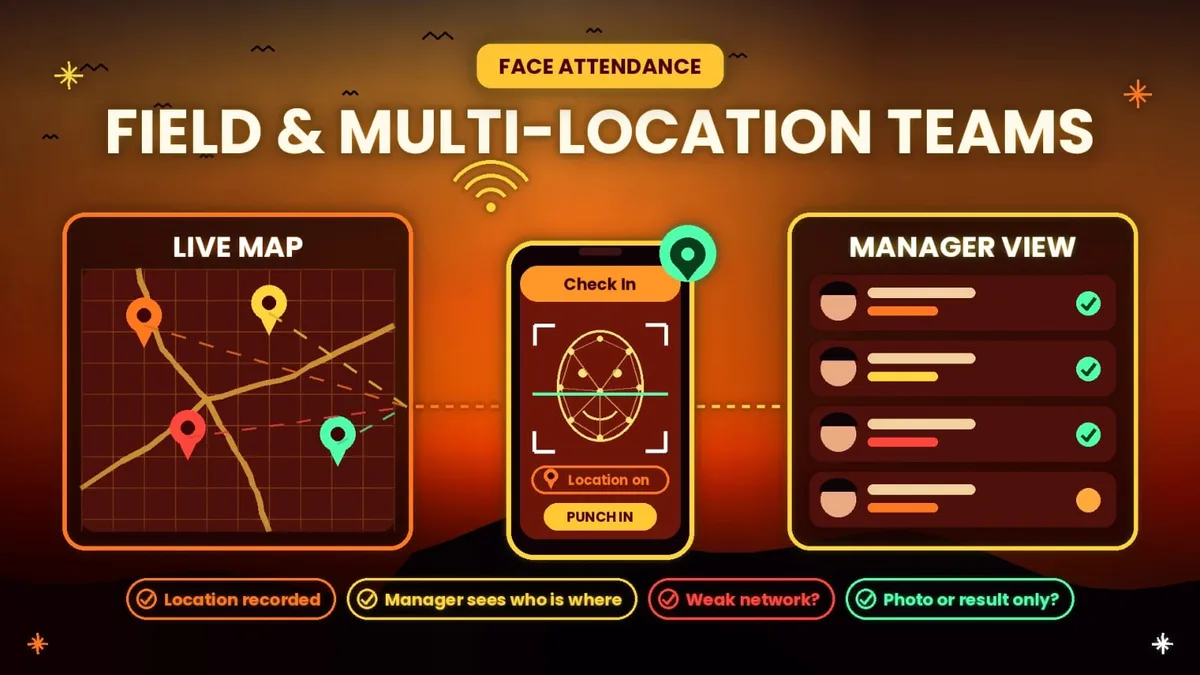
Sales staff, service engineers and site supervisors cannot walk to a gate every morning. For them, phone-based check-in is the practical choice. Ask whether it records the location, whether a manager can see who is where, what happens when the network is weak, and whether the photo is stored or only the result.
A Look at Attendi
Attendi is an attendance and payroll app for office, multi-location and field teams, available on Android and iOS. Plans are priced per user per month, with 18% GST extra and unlimited employees on every plan:
Basic, ₹39: QR attendance, leave, working hours and reports. Advanced, ₹49: adds selfie attendance and payroll. Pro, ₹59: adds face capture and field workforce tracking, including sites, visits and live tracking.
There is a 3-day free trial in the app. Use the same 7-day test from this guide during the trial, so you see how it behaves at your own gate with your own staff.
Privacy and Legal Points in India
A face is biometric data, so treat it with care. This is general information, not legal advice, so check with a lawyer for your case.
Give written notice. Tell employees what you collect, why, where it is stored and how long you keep it. Take written consent. India’s Digital Personal Data Protection Rules were notified in November 2025, and the notice and consent rules start on 13 May 2027. Until then, the older IT Rules of 2011 already treat biometric data as sensitive and expect consent and reasonable security. Collect only what you need. Do not reuse face data for anything other than attendance. Offer a fallback. If someone says no, give them another way to mark attendance, such as a card or manager approval. Delete on exit. Remove a person’s face data when they leave, and limit who can view it. Schools: for students under 18, the Act requires a parent’s or guardian’s consent.
How to Set Up in 5 Steps
Choose a device or an app, and pick a plan. Tell staff what is collected and take their consent. Enrol faces in good light, then set shifts, late rules and holidays. Run it next to your old method for a week and compare. Move payroll to the new data and check the first report line by line.
FAQs
How accurate is a face recognition attendance system? No system is perfect. Accuracy depends on light, camera quality and how well faces were enrolled. Ignore claims of 100% and test with your own staff for a week, counting wrong matches and failed scans.
Does it work with a mask? Some systems struggle. Others work better if the person is enrolled once with a mask. Check this during the trial, not after you buy.
Can a photo fool it? Basic systems can be fooled. Systems with a liveness check are much harder to cheat. Try it yourself with a photo, with the employee’s permission.
Does it work without internet? Some devices save punches and send them later. Some apps need a connection. Ask before you buy.
What does it cost per employee? Apps in India run about ₹39 to ₹59 per user per month plus GST. A device costs ₹6,000 to ₹14,000 one time and covers everyone at that entrance.
Do employees have to agree to it? Treat it as yes. Give written notice, take consent, and keep another way to mark attendance for anyone who refuses.
Final Thoughts
A simple rule works for most businesses. If many people pass through one gate, a device suits you. If your people work in different places, an app suits you. If you cannot decide, run the 7-day test with a free trial before paying for anything. Choose the one your staff can use in a few seconds without help, because that is the one that will actually stay in use.