Employee Leave Management System: From Requests to Approvals
An employee leave management system takes leave from a vague message in a chat group to a clear, tracked request that is approved, recorded and counted against a balance. In many Indian businesses, leave still travels by phone call, WhatsApp message or a line in a notebook, and nobody is fully sure how many days are left, who approved what or whether a day should be paid. That confusion leads to disputes, salary corrections and managers who spend their week answering the same questions. This guide follows leave from request to approval, explains the leave types and rules you need to define, and shows how to set up an employee leave management system that your team will actually use.
What Is an Employee Leave Management System?
An employee leave management system is software that handles leave requests, approvals, balances and records in one place. Employees apply for leave on a phone or computer, managers approve or reject the request, and the system updates the leave balance and the attendance record automatically.
It is often part of a wider attendance or HR tool, but it can also work on its own. What matters is that every request has a date, a reason, a decision and a result that everyone can see.
Why Chat Messages and Spreadsheets Fail for Leave
Leave looks simple until a team grows beyond a handful of people. Then the same problems appear again and again:
Lost requests. A leave message gets buried in a busy chat group.
Unclear balances. Nobody can say quickly how many days an employee has left.
Inconsistent approvals. Different managers say yes or no on different grounds.
Clashes in the team. Three people are off on the same day because nobody could see the others' plans.
Payroll confusion. Paid and unpaid leave are mixed up, which changes salary.
No record. When an employee says a leave was approved, there is nothing to check.
None of this means people are careless. A chat group and a notebook were never built to track balances and decisions.
From Request to Approval: The Journey of One Leave
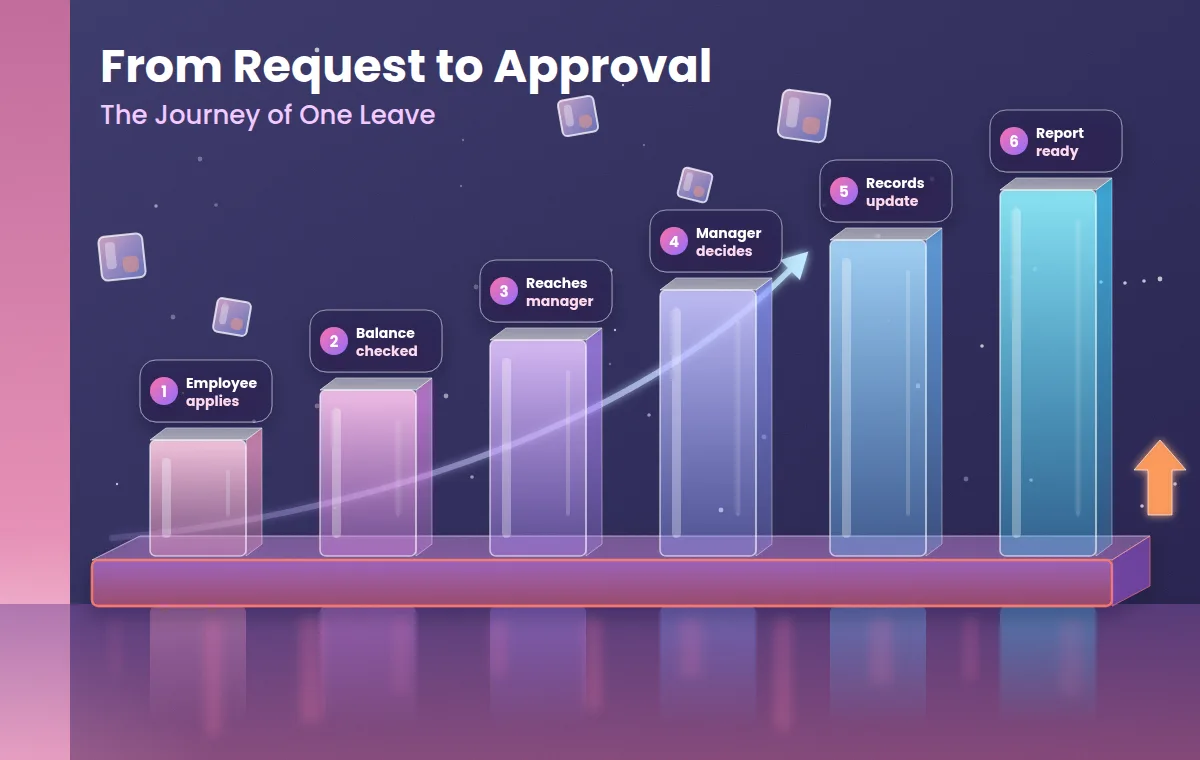
It helps to follow a single leave request through a good system and see what happens at each step.
1. The Employee Applies
The employee picks the leave type, the dates and a short reason, and sends the request from their phone. The request is time stamped and linked to their profile.
2. The System Checks the Balance
Before the manager sees it, the system checks whether the employee has enough balance for that leave type and whether the dates fall on a holiday or weekly off. If the balance is short, the employee can see it at once.
3. The Request Reaches the Right Manager
The request goes to the person you have named as approver. The manager sees the dates, the balance and, ideally, who else in the team is already off.
4. The Manager Decides
The manager approves or rejects with a short note. A rejection without a reason causes trouble, so many policies ask for one.
5. Records Update Themselves
Once approved, the leave balance falls, the attendance record shows leave for those days and the dates appear in the team calendar. Nobody has to update three places.
6. The Month-End Report Is Ready
At month end, leave taken, leave balance and unpaid days are already totalled and can feed into payroll.
Common Leave Types and Rules to Define
Every business names its leave types differently, and the entitlements depend on your policy and on the law that applies to you. The table below shows typical types and what you should decide for each. Treat it as a checklist, not as legal advice.
Leave type | Typical purpose | Usually paid? | Rule to define |
|---|---|---|---|
Casual leave | Short personal needs | Yes, within the yearly limit | Days per year, notice needed, carry forward |
Sick leave | Illness or medical needs | Yes, within the yearly limit | Days per year, when a medical certificate is needed |
Earned or privilege leave | Planned time off | Yes | How it accrues, whether it can be encashed or carried forward |
Half-day leave | Part of a day | Counted as half a day | Which hours count as a half day |
Compensatory off | Time off for extra work | Yes | When it is earned and how long it stays valid |
Maternity and other statutory leave | As set by law | As set by law | Confirm with a qualified professional |
Unpaid leave | Leave with no balance left | No | When leave becomes unpaid and how salary is adjusted |
Whatever your list looks like, write each rule in plain words before you enter it into a system.
Writing a Leave Policy a System Can Follow
Software can only apply rules that exist. A short, clear policy covers:
Leave types and yearly entitlement for each type.
Notice period for planned leave and the rule for emergencies.
Weekly offs and holidays, and whether they count inside a leave period.
Carry forward and encashment, if you allow them.
Approval chain, meaning who approves, and who approves when that person is away.
Cut-off dates for applying or cancelling.
Proof needed, such as a medical certificate after a certain number of sick days.
When these rules are written, a manager no longer has to decide each case from scratch, and employees know what to expect.
How Leave Connects to Attendance and Payroll
Leave is never a separate subject. An approved leave must show up in the attendance record, and the unpaid days must reach payroll. When these three live in different places, someone has to copy the numbers across, which is where errors enter. When leave, attendance and records sit in one system, the approved request updates everything at once.
To see how leave, attendance and employee records come together in one tool, you can look at the Attendi features page.
Designing Approval Workflows
Approval is the step that decides whether the system feels fair or frustrating. A few design choices help:
One clear approver for most requests, usually the direct manager.
A backup approver when the first one is on leave, so requests do not wait.
A response time, such as one working day, after which the request is escalated.
Team visibility, so managers can see who else is off before they approve.
Cancellation rules, so employees know how to withdraw a request.
Some businesses have more complex needs, such as multi-level approvals for long leave, different rules for different sites or links with their own HR or billing systems. A ready-made tool may not cover everything. A development partner such as Nexify, which offers custom software development and business automation, is the kind of team to speak with when you need a workflow that off-the-shelf tools do not provide. Before going custom, write down exactly what the ready-made tool cannot do.
Benefits of an Employee Leave Management System
Clear balances. Employees and managers see the same number at any time.
Faster decisions. Requests do not wait in a chat group, and approvals take minutes.
Fair treatment. The same rules apply to everyone in the same way.
Better planning. Managers see team availability before they approve.
Cleaner payroll. Unpaid days are known before salary is prepared.
Less back and forth. Fewer messages asking "how many days do I have left?"
A reliable record. Every request, decision and change has a date and a name against it.
Features to Look For
A long feature list can hide the few things you actually need. Start with this shortlist:
Mobile app that is quick and works on a slow connection.
Flexible leave types and accrual rules that match your policy.
Balance check at the time of applying.
Approval flow with a backup approver and reminders.
Team calendar showing who is off and when.
Link with attendance, so approved leave updates the attendance record.
Reports you can export for payroll and reviews.
Role-based access so managers see only their own team.
Audit trail that shows who approved or changed a request.
Who Needs an Employee Leave Management System?
Any business with staff can use one, but the gain is clearest in these situations:
Small businesses with no HR person, where the owner tracks leave in a notebook.
Teams with shifts, where one absence changes the whole schedule.
Companies with several branches, where managers approve leave independently.
Schools and coaching centres, where cover for absent teachers must be planned.
Teams with field staff, where leave must be visible to people who are rarely in the office.
Compliance and Legal Points
Leave entitlements in India depend on the type of establishment, its size and the state, and some leave, such as maternity leave, is set by law. A system can apply the rules you give it and keep clear records, but it does not decide your legal duties. Confirm your obligations with a qualified labour-law or payroll professional, and check that the tool can handle the leave types they tell you are required.
Privacy and Data Safety
Leave records can reveal sensitive things, such as health problems or family events. Before you choose a provider, ask:
Who can see the reason for a leave, and can I limit it to the approver?
Is data encrypted, and where is it stored?
How often are backups taken, and how can I restore them?
Is there a log of who viewed or changed records?
Is there a clear privacy policy I can read before signing up?
A published policy is a good sign that a vendor takes the subject seriously. You can read how Attendi explains this on the Attendi privacy policy page. In India, the Digital Personal Data Protection Act, 2023 sets duties for organisations that handle personal data, and its rules are being brought into effect in stages. This is general information and not legal advice, so confirm your own duties with a qualified professional.
How to Start in 30 Days
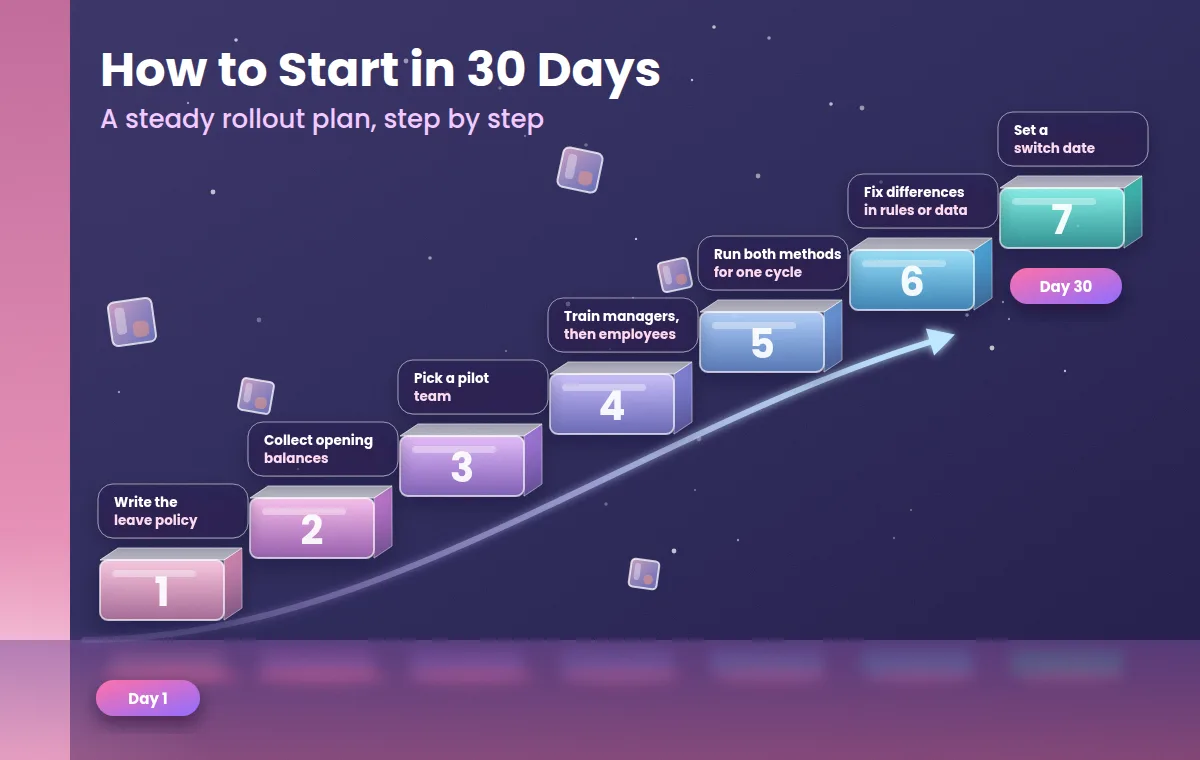
Most failed rollouts try to change everything in a week. A steadier plan works better.
Write down your leave policy on one page.
Collect opening balances. List each employee's current balance for every leave type, and have the manager confirm it.
Pick one pilot team with a willing manager.
Train managers first, then employees, using real leave examples.
Run both methods for one cycle. Keep the old notebook beside the system for a month and compare the balances.
Fix differences in rules or data before switching fully.
Set a switch date. After that date, only the system record counts.
To see what the setup flow looks like before you begin, the Attendi how it works page explains it step by step.
Common Mistakes to Avoid
Starting without a written policy. If your rules are unclear, the software only records the confusion.
Wrong opening balances. One wrong starting number creates months of disputes.
No backup approver. Requests pile up when one manager is away.
Allowing leave through chat as well. Two channels mean two records.
Giving everyone full access. Leave reasons should be visible only to the people who need them.
Never reviewing. A policy that suits ten people may need changes at fifty.
How to Measure Whether It Is Working
You do not need complex analytics. After two or three months, look at a few simple signs:
Average time taken to approve a leave request.
Number of disputes about balances or paid and unpaid days.
Number of clashes where too many people were off together.
Number of payroll corrections caused by leave.
Employee feedback on how clear the process feels.
If these numbers improve, the system is doing its job.
Frequently Asked Questions
What is an employee leave management system? It is software that handles leave requests, approvals, balances and records in one place, and links them to attendance and payroll.
How does leave approval work in the system? The employee applies, the system checks the balance, the request goes to the approver, and once approved the balance and attendance record update automatically.
Can it handle different leave types? Most tools let you create your own leave types, yearly limits and rules. Check that the tool can follow your policy before you buy.
Is it only for large companies? No. Small teams with no HR staff often gain the most, because the owner saves time and avoids disputes.
What happens if a manager is away? A good system lets you name a backup approver or escalate the request after a set time.
How does leave affect salary? Approved paid leave is paid as usual, and unpaid days reduce salary as per your policy. The system passes these totals to payroll.
Is leave data safe? It depends on the tool. Ask about role-based access, encryption, backups, an audit log and a published privacy policy.
Final Thoughts
An employee leave management system is a simple idea: every leave request has a clear path from the employee's phone to the manager's decision and into the records that matter. You do not need the biggest tool. You need one that follows your policy, shows balances clearly and that your managers will use every day. Start by writing your rules, enter correct opening balances and run the new system beside your old method for one cycle. With a careful start, leave stops being a source of arguments and becomes a routine step in running your team.