Automated Attendance System Using Face Recognition
Every business owner has faced the same problem at some point: the attendance sheet says one thing, but the actual working hours say another. Someone logs in late and nobody notices, a colleague marks attendance for a friend, or the HR team spends the last two days of the month fixing errors. An automated attendance system using face recognition solves these problems at the root. Instead of trusting registers, cards, or PINs, it trusts the one thing that cannot be borrowed or shared: the employee's face.
In this blog, we will look at how face-based attendance works, why it matters for measuring working hours, where it beats older methods, and what you should check before choosing a solution for your team.
Why Working Hours Data Goes Wrong in Most Offices
Working hours are the base for salary, overtime, shift planning, and productivity analysis. Yet in many workplaces this data is the least reliable. Paper registers get lost or overwritten. Swipe cards can be handed to a colleague. Even a simple app check-in can be done from anywhere if there is no identity verification behind it.
The result is a cycle of small errors that add up. A ten-minute difference per employee per day looks harmless, but in a team of fifty it becomes dozens of hours every month. Payroll disputes follow, trust between employees and management drops, and managers lose time resolving issues instead of running the business.
This is exactly why more companies are moving toward automated attendance. Businesses today are adopting digital tools across operations, and platforms such as face capture attendance technology show how technology can replace repetitive manual work with faster and more reliable processes. When the system records time without anyone typing, signing, or approving it, the data becomes consistent, and consistent data is the first step towards fair working hour management.
What Is an Automated Attendance System Using Face Recognition?
An automated attendance system using face recognition is software that identifies a person from their facial features and logs their check-in and check-out time automatically. The employee simply looks at a phone camera, tablet, or a mounted device. Within a second or two, the system confirms who they are and stores the exact timestamp.
There is no card to carry, no fingerprint to press, and no register to sign. Because the process is contactless, it is also more hygienic than shared fingerprint scanners, which became a major concern for many offices in recent years. If you want to see what this looks like in practice, you can check how attendance tracking works and follow the flow from employee check-in to the final report.
How Face Recognition Attendance Works
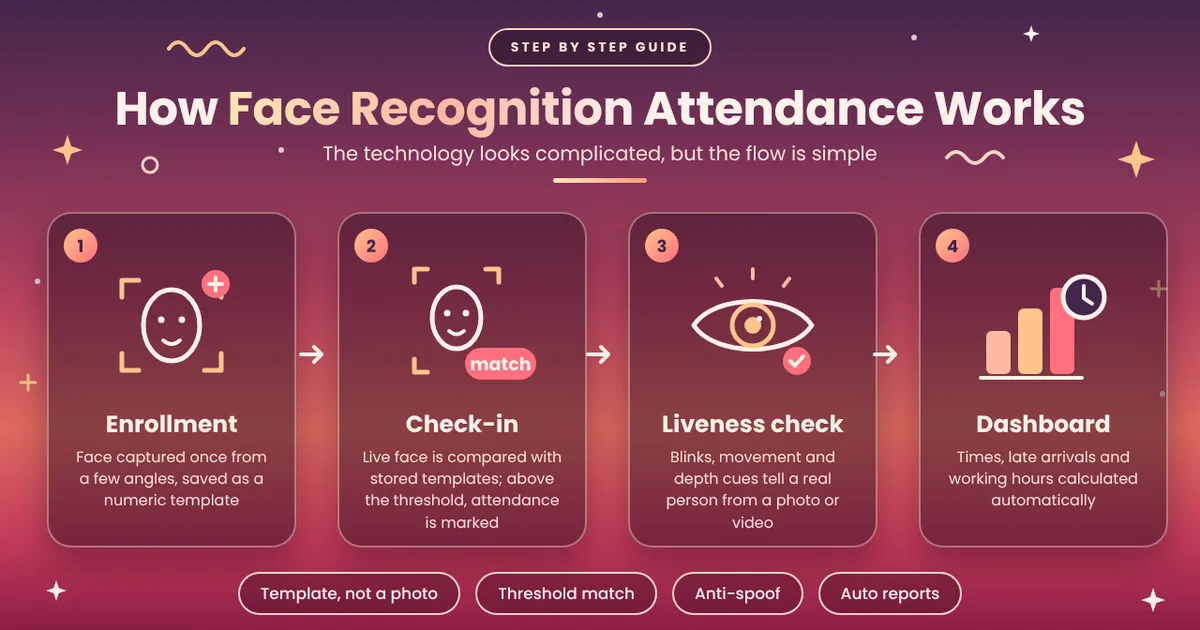
The technology looks complicated, but the flow is simple when explained step by step in plain terms.
First comes enrollment. Each employee's face is captured once, usually through a few photos taken from slightly different angles. The system converts these images into a mathematical template, which is a set of numbers describing the unique measurements of the face, such as the distance between the eyes and the shape of the jawline. It does not simply store a photo for comparison.
Next is the actual check-in. When the employee stands in front of the camera, the system captures a live image, builds a fresh template, and runs a face match against the stored templates. If the similarity score crosses a set threshold, the person is identified and the attendance is marked. If not, the entry is rejected or flagged for review.
Modern systems also add liveness detection. This checks whether a real, live person is in front of the camera and not a printed photo or a video played on another phone. Blinking, slight movement, and depth cues help the software tell the difference. This layer is what makes face-based attendance reliable enough for serious business use.
Finally, the data flows into the dashboard. Check-in time, check-out time, late arrivals, early exits, and total working hours get calculated automatically without any manual input from HR. A complete platform should also offer shift management, leave tracking, overtime rules, and exportable reports, and you can see all of these on the face capture attendance features page.
The Link Between Face Recognition and Accurate Working Hours
The biggest advantage of biometric face attendance is that it ties every punch to a verified identity. When the identity is certain, the working hours calculated from it are certain too.
Think about buddy punching, where one employee marks attendance for another. With a card or PIN system, this is easy and common. With face recognition, it is practically impossible, because the system needs the actual person to be present at the moment of check-in.
Accurate timestamps also help with overtime. If an employee stays two extra hours on a busy day, the system captures the exact check-out time, and the overtime can be calculated without arguments. In the same way, short shifts, half days, and late marks are recorded exactly as they happened, which keeps payroll clean and defensible.
For businesses with multiple shifts, a face-based system can match each punch to the correct shift automatically. This saves supervisors from checking who worked which slot and reduces the chance of errors during salary processing.
Face Recognition vs Other Attendance Methods
Many teams still compare face recognition with older methods before deciding. The table below gives a quick view of how they differ when the goal is accurate working hours tracking.
Feature | Manual Register | RFID / Swipe Card | Fingerprint Scanner | Face Recognition |
|---|---|---|---|---|
Identity verification | Very low | Low (card can be shared) | High | High |
Risk of proxy attendance | Very high | High | Low | Very low |
Contactless | Yes | Partly | No | Yes |
Speed per check-in | Slow | Fast | Moderate | Fast |
Hardware cost | None | Moderate | Moderate to high | Low (works on phone or tablet) |
Working hours accuracy | Poor | Average | Good | Excellent |
Payroll-ready reports | Manual effort | Partly automatic | Automatic | Automatic |
As the table shows, face recognition offers the best balance of accuracy, speed, and cost, especially for small and mid-sized businesses that do not want to invest in heavy hardware.
Benefits for HR, Managers, and Employees
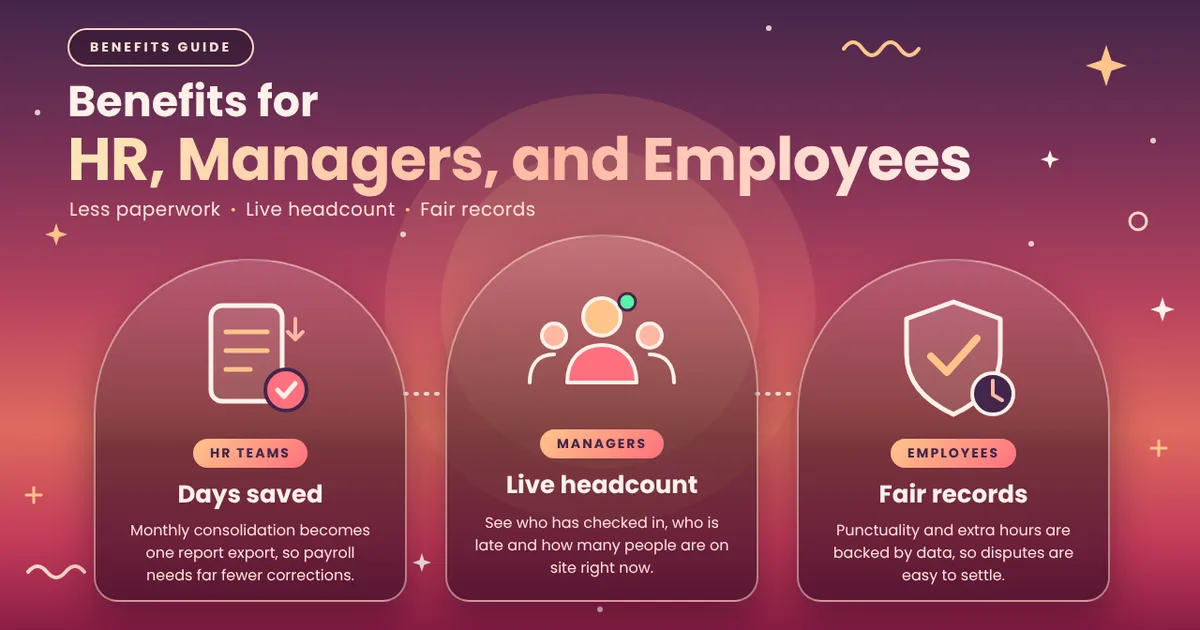
For HR teams, the biggest relief is time. Monthly attendance consolidation, which used to take days, becomes a matter of exporting a report. Leave records, late marks, and working hours are already organised, so payroll can be processed with far fewer corrections. The cost is also easy to manage, since you can review the face capture attendance plans and pick one that matches your team size without paying for features you do not need.
Managers gain real-time visibility. They can see who has checked in, who is running late, and how many people are on site at any moment. This is especially useful for field teams, retail outlets, and factories where headcount at the start of a shift matters.
Employees benefit too, even if they do not always expect it. A transparent record protects honest workers from unfair deductions, because their punctuality and extra hours are backed by data. Disputes become easier to resolve, since the record is objective.
Privacy and Data Security: What You Should Know
Whenever biometric data is involved, privacy is a fair concern, and a responsible business should address it openly. A well-designed system stores face templates in encrypted form rather than raw photos, restricts access to authorised admins, and follows data protection practices.
It is also good practice to take employee consent before enrollment, explain what is stored and why, and define how long the data is kept. When people understand that their data is used only for attendance and working hours, adoption becomes much smoother. Choosing a provider that is transparent about security helps you avoid problems later.
Common Challenges and How to Handle Them
No technology is perfect, and it helps to know the usual hurdles in advance. Poor lighting can affect recognition accuracy, so it is wise to place the camera or tablet in a well-lit area. Employees who change their appearance significantly, for example by growing a beard or wearing glasses, may need to update their enrollment photos. Masks and caps can also reduce accuracy in some systems, so check whether your solution handles partial face coverage.
Another common challenge is internet connectivity. If the system depends on the cloud, a weak connection can slow down check-ins. Look for a solution that can store punches temporarily and sync once the network returns.
These issues are easy to manage with a little planning, and they are far smaller than the daily problems caused by manual attendance.
How to Choose the Right Face Recognition Attendance Solution
Before choosing a tool, think about how your team actually works. A good solution should be simple enough that employees can start using it without long training. Beyond the face match itself, look for shift management, leave tracking, late and overtime rules, and clear reports, along with pricing that scales fairly as your headcount grows.
Finally, test before you commit. Run a short pilot with a small group, check recognition accuracy in your real office lighting, and gather feedback from employees. A few weeks of real usage will tell you more than any brochure.
Tips for a Smooth Rollout
A successful rollout depends as much on communication as on technology. Start by telling your team why you are making the change: fair working hours, faster payroll, and fewer disputes. Make enrollment easy by setting aside a short time slot where everyone can register their face in one go.
Keep a backup process for the first few weeks, such as a manual approval option for exceptions, so that no employee is penalised because of a technical hiccup. Review the first month's reports together with your HR team, fix any rule mismatches in shifts or grace periods, and then make the system your single source of truth for attendance.
Over time, the data also becomes valuable beyond payroll. Patterns in late arrivals, average working hours by department, and overtime trends can help you plan staffing and improve productivity.
Final Thoughts
An automated attendance system using face recognition is no longer a luxury reserved for large corporations. It is a practical, affordable way to bring accuracy and fairness to working hours, remove proxy attendance, and cut hours of manual work for HR. By combining automated attendance, reliable face match technology, and clear privacy practices, businesses can build a record of working hours that everyone trusts.
If your current attendance process still depends on registers, shared cards, or manual corrections, now is a good time to make the shift. Start with a small pilot, measure the difference in accuracy and time saved, and expand from there. Your payroll, your managers, and your employees will all notice the improvement.