Attendance Payroll Management System: From Hours to Salary
An attendance payroll management system turns the hours your team works into the salary they are paid, using one record from the first check-in to the last payslip. In many Indian businesses, that journey still passes through a register, a shared sheet and a payroll file, and every hand-off is a chance for a mistake. A late mark is missed, a leave day is counted twice, overtime is forgotten, and an employee finds out only when the salary arrives. This guide follows the path from hours to salary step by step, shows a simple worked example, explains where errors usually creep in and helps you decide how to set up an attendance payroll management system that your team can trust.
What Is an Attendance Payroll Management System?
An attendance payroll management system is software that records employee attendance, working hours, overtime and leave, and uses those records to prepare salary data. Staff mark attendance on a phone or computer, managers approve leave and corrections, and the system applies your rules to produce paid-day totals for payroll.
Some tools calculate the complete salary, including deductions. Others prepare clean attendance and leave totals that you export to a payroll or accounting tool. Both are useful, as long as attendance and salary come from the same record and not from two separate sheets.
The Journey From Hours to Salary
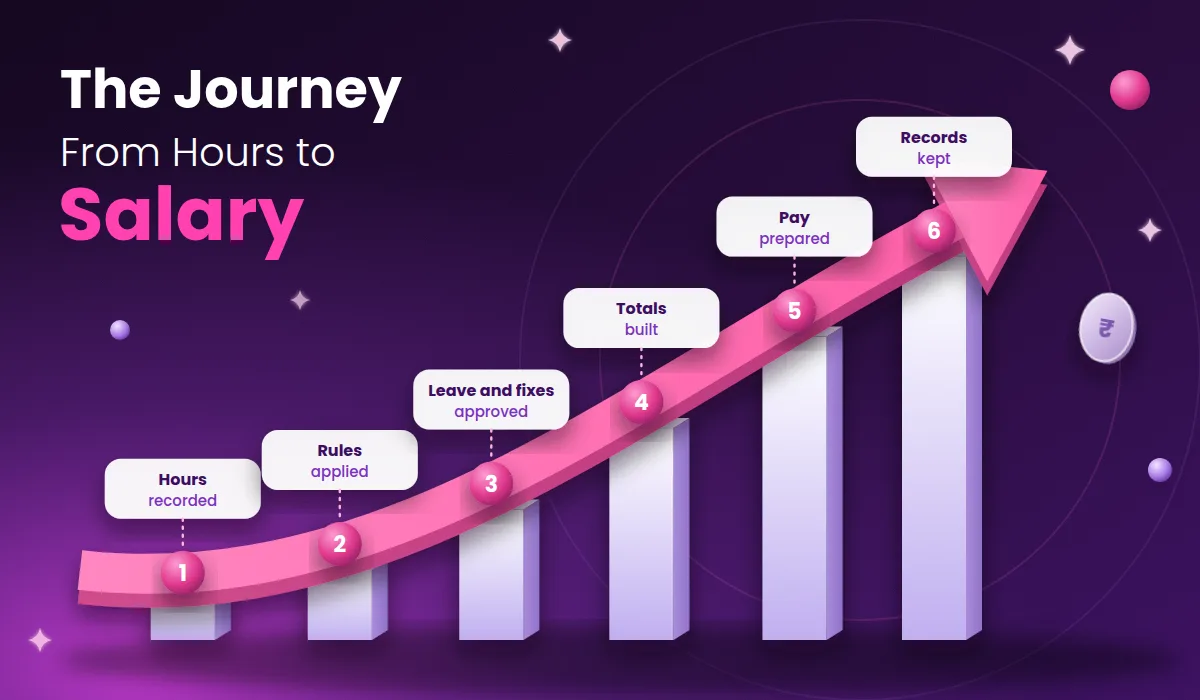
It helps to see salary as the end of a chain. If any link is weak, the final number is wrong.
1. Hours Are Recorded
Every working day starts with a check-in and ends with a check-out. When staff mark attendance on their phones, the time is recorded at once, so nobody has to remember it later.
2. Rules Are Applied
Your rules decide what the hours mean: the shift timing, the grace time for late arrival, the hours that make a half day and the point where overtime begins. The system applies the same rules to everyone.
3. Leave and Corrections Are Approved
Leave requests and attendance corrections reach the manager online. Once approved, they update the record, and the leave balance changes automatically.
4. Totals Are Built
At the end of the cycle, the system counts present days, weekly offs, paid leave, unpaid leave, late marks and overtime hours.
5. Pay Is Prepared
The totals feed the salary calculation, or they are exported to your payroll tool. Because the totals come from daily records, there is no manual counting step.
6. Records Are Kept
Employees can view their own attendance and leave, and the business keeps a clear history of what was counted and why.
A Simple Worked Example
The table below shows how attendance turns into paid days. It is only an illustration: it assumes a monthly salary of ₹30,000, a 30-day month and a policy where weekly offs and approved paid leave are paid. Your own policy decides the exact treatment.
Item | Days | How it is counted | Paid days |
|---|---|---|---|
Days present | 24 | Paid in full | 24 |
Weekly offs | 4 | Paid as per policy | 4 |
Approved paid leave | 1 | Paid from leave balance | 1 |
Unpaid leave | 1 | Not paid | 0 |
Total | 30 | 29 |
With a daily rate of ₹1,000 (₹30,000 divided by 30), 29 paid days give ₹29,000 before any other additions or deductions. If the same data were counted by hand from a register, the unpaid day and the leave balance are exactly where mistakes tend to appear.
Where Errors Creep In Between Hours and Salary
Copying errors. Numbers typed from a register or sheet into a payroll file are easy to get wrong.
Late corrections. A missed punch or an unrecorded leave is found after salary is prepared.
Uneven rules. Different managers apply the grace time differently, so two employees with the same hours get different pay.
Missed overtime. Extra hours are forgotten when they are not recorded at the time.
Leave confusion. Paid and unpaid leave get mixed up, which changes the final pay.
Unexplained changes. Edits made without approval cannot be justified later.
When the chain from hours to salary sits in one system, most of these causes disappear, because there is only one record to check.
Handling Shifts, Late Marks and Overtime
Three situations cause most payroll arguments, so write a rule for each before you switch.
Shifts. If your team works in shifts, the system should know each person's shift so that late marks and overtime follow it. A night-shift employee should not be marked late against a day-shift timing.
Late marks. Decide the grace time and what happens after it. For example, you may decide that a certain number of late marks in a month equals a half day. Whatever you choose, write it down and apply it to everyone.
Overtime. Decide when overtime starts, whether it needs approval and how it is paid or compensated. Overtime pay rules can be set by law for some workplaces, so confirm your duties with a qualified professional.
Key Features to Look For
A long feature list can hide the few things you actually need. Start with this shortlist:
Mobile attendance that is quick and works on a slow connection.
Flexible rules for grace time, half days, overtime, week offs and your own leave types.
Shift support so late marks and overtime follow each person's shift.
Leave management with online requests, approvals and visible balances.
Correction requests with approval and a visible history.
Payroll-ready reports that can be exported for salary processing.
Employee self-service so staff see their own attendance and leave balance.
Role-based access so only the right people see salary-related data.
Audit trail that shows who changed a record and when.
To see how attendance, leave and employee records come together in one tool, you can look at the Attendi features page.
Benefits of Connecting Attendance to Payroll
Fewer salary errors. Pay starts from verified attendance and leave, not manual totals.
Faster month-end. The step of collecting attendance disappears, so salary can be prepared sooner.
Fewer disputes. An employee who questions a deduction can be shown the exact days and the rule that applied.
Fair treatment. The same rules apply to every employee in the same way.
Better planning. Overtime and absence patterns show up in reports before they become costly.
More trust. When employees can see how their pay was reached, they are less likely to doubt it.
Answering Salary Questions Without Chaos
Even with accurate records, employees will ask questions: why was a day cut, how many leave days are left, when will the payslip arrive. If these questions travel through random phone calls and chat messages, they get lost. A simple helpdesk works better. Share one WhatsApp number for payroll questions on the notice board or intranet, using a click-to-chat link or QR code. A tool such as Walinko, which creates WhatsApp links and QR codes, can make that link in minutes. Whatever channel you use, give every question an owner and a reply time, and answer from the system record.
Who Needs an Attendance Payroll Management System?
Any business that pays salaries from attendance can use one, but the gain is clearest in these situations:
Small businesses with no HR person, where the owner or office manager prepares salary by hand.
Businesses with shifts and overtime, such as factories, clinics and shops, where hours directly change pay.
Companies with several branches, where attendance comes from many managers.
Schools and coaching centres, where teacher attendance and leave affect monthly pay.
Teams with field staff, such as sales and service teams who are not at a desk.
Compliance and Statutory Duties
Payroll in India involves rules that depend on company size, industry and state, such as provident fund, state insurance, professional tax and income tax deductions. A system can help by keeping accurate records and producing the data these duties need, but it does not replace professional advice. Confirm your obligations with a qualified accountant or payroll professional, and check that any tool you choose can produce the reports they ask for.
Privacy and Data Safety
Salary and attendance data is sensitive. Before you choose a provider, ask:
Who can see which data, and can I limit salary-related access by role?
Is data encrypted, and where is it stored?
How often are backups taken, and how can I restore them?
Is there a log of who viewed or changed records?
Is there a clear privacy policy I can read before signing up?
A published policy is a good sign that a vendor takes the subject seriously. You can read how Attendi explains this on the Attendi privacy policy page. In India, the Digital Personal Data Protection Act, 2023 sets duties for organisations that handle personal data, and its rules are being brought into effect in stages. This is general information and not legal advice, so confirm your own duties with a qualified professional.
How to Choose the Right System
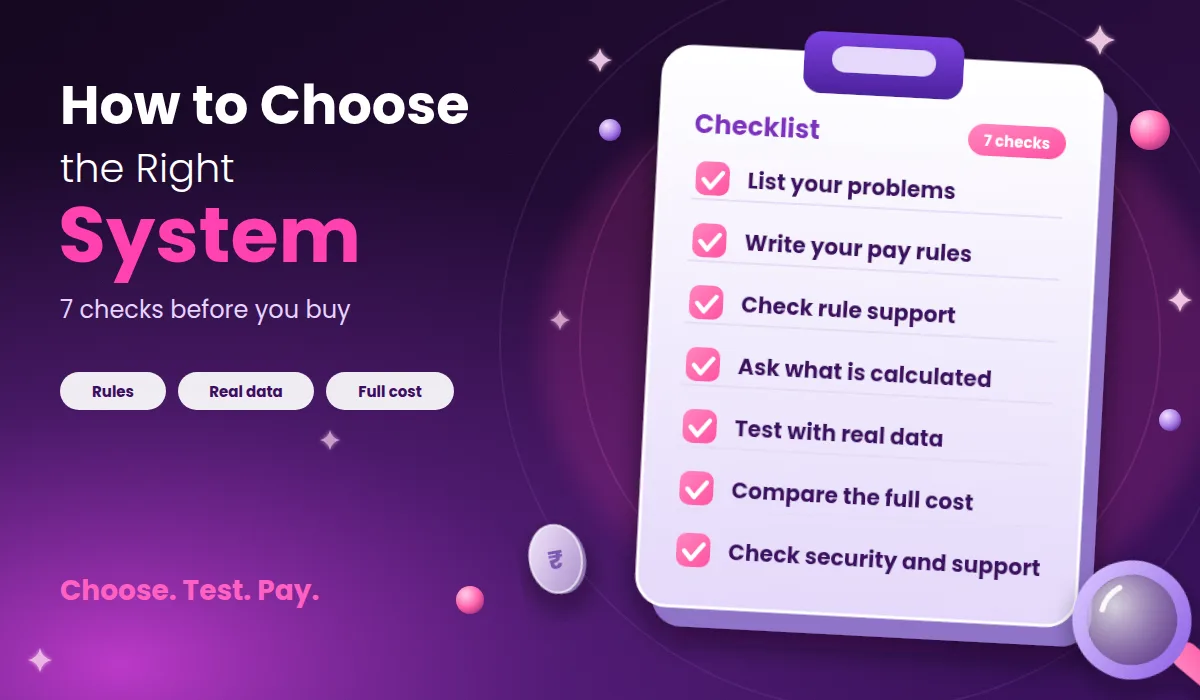
List your problems. Write down what hurts most, such as wrong day counts, missed overtime or late salary.
Write your pay rules. Put grace time, half-day hours, overtime and leave policy on one page.
Check rule support. Make sure the system can follow your rules without workarounds.
Ask what is calculated. Find out whether the tool calculates salary or only prepares data for export.
Test with real data. Run a trial with a small team for at least one full cycle.
Compare the full cost. Most tools charge per person per month, and prices are often shown before GST, so ask for the total you will pay.
Check security and support. Ask about permissions, backups and response time.
How to Start in 30 Days
The safest way to switch is to run the new system beside your old method for one salary cycle.
Write down your rules on one page.
Clean your employee data and pay details before entering them.
Pick one pilot team with a willing manager.
Train managers first, then employees, using real examples.
Run both methods for one cycle. Compare the paid-day totals from both.
Fix differences in rules or data before switching fully.
Set a switch date. After that date, only the system record counts.
To see what the setup flow looks like before you begin, the Attendi how it works page explains it step by step.
Common Mistakes to Avoid
Switching without written rules. If your policy is unclear, the software only records the confusion.
Skipping the parallel cycle. Running both methods once catches most setup errors before they affect pay.
Giving everyone full access. Salary data should be visible only to the people who need it.
Ignoring corrections. Without an approval flow, edits become hard to explain.
Never reviewing. A setup that suits ten people may need changes at fifty.
How to Measure Whether It Is Working
You do not need complex analytics. After two or three months, look at a few simple signs:
Time taken to prepare salary after the cycle ends.
Number of salary corrections after payment.
Number of disputes about deductions or leave.
Share of leave and correction requests approved on time.
Employee feedback on how clear their records are.
If these numbers improve, the system is doing its job. If not, check whether the problem is the rules, the training or the tool.
Frequently Asked Questions
What is an attendance payroll management system? It is software that records attendance, working hours, overtime and leave, and uses those records to prepare salary data, so that pay comes from verified information.
How does attendance turn into salary? The system counts paid days, unpaid days, late marks and overtime from daily records, applies your rules and either calculates salary or exports the totals to a payroll tool.
Does it calculate salary automatically? Some tools calculate full salary, and others prepare attendance and leave totals for export. Check which one a product does before you buy.
Is it only for large companies? No. Small teams with no HR staff often gain the most, because the owner saves time and avoids salary mistakes.
How does it handle late marks and half days? You set a grace time and the hours that count as a half day. The system then applies those rules to everyone in the same way.
How long does setup take? For a small team, basic setup takes a few days to two weeks. Running one full cycle side by side takes most of the time.
Is salary data safe? It depends on the tool. Ask about role-based access, encryption, backups, an audit log and a published privacy policy, and whether you can export or delete your data.
Final Thoughts
An attendance payroll management system is a simple idea: one record that carries the hours your team works all the way to the salary they are paid. You do not need the biggest tool. You need one that follows your rules, keeps clean records and that your managers will use every day. Start by writing your pay rules, test with one real team through a full salary cycle and keep what works. With a careful start, salary stops being a monthly worry and becomes a routine result of records you already trust.